Page speed & UX report
wikipedia.org
Measured speed plus a read of the page for what's costing conversions. Free · convradar.com
These pages look fast and clean — LCP 1.2s. The UX read below flags 4 things to look at.
wikipedia.org
You chose this page
97/100 — Fast. Visitors wait ~1.2s before seeing content.
- Avoid multiple page redirects~780ms
- Images×256 KB
- HTML×131 KB
- JavaScript×211 KB
- Other×11 KB
Consider this
Below the measured facts: what our conversion-pattern library and an AI read of the page flag — not from your analytics. Treat them as leads to test on your data, not guaranteed wins.
AI review of this page — 4 things to look at— each shows where it is on the page
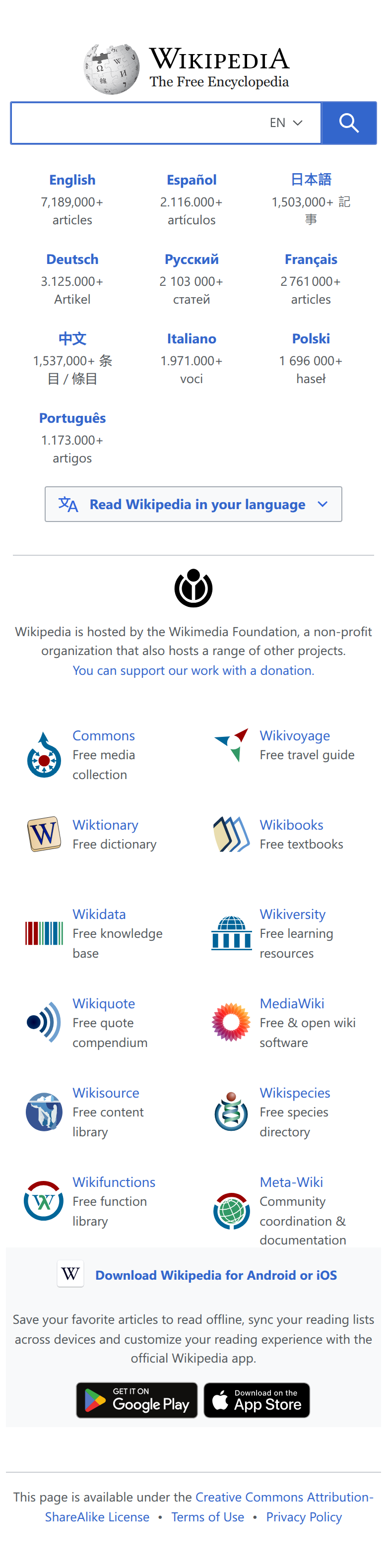
Search bar with empty placeholder and 'EN' language dropdown
Add a concrete placeholder prompt like 'Search 7,189,000+ articles…' inside the search input to immediately communicate scale and invite action — the current blank field gives no visual pull to engage with the primary function of the page.
'You can support our work with a donation.' link
Replace the small inline hyperlink with a distinct, pill-shaped CTA button (e.g., 'Donate to Wikipedia') in a contrasting colour — the donation ask is Wikipedia's critical conversion goal but it's visually indistinguishable from body text, making it easy to miss entirely on mobile.
'Download Wikipedia for Android or iOS' heading and app-store badges
The Google Play and App Store badges are cut off at the bottom of tile 2 and appear cramped after a very long list of sister projects. Move the app download section above the sister-project grid, or give the badges more breathing room and a short social-proof line (e.g., '4.5★ · 10M+ downloads') to increase tap-through.
9-language link grid (English, Español, 日本語, Deutsch … Português)
Inconsistent number formatting across languages (e.g., '7,189,000+' vs '2.116.000+' vs '2 103 000+') erodes credibility and looks like a data error. Standardise to one locale format (e.g., '2,116,000+' for all) so the article-count proof points feel authoritative rather than broken.
Checked: mobile load speed (Google PageSpeed) · layout & UX from a live mobile screenshot
Free · no card · one Google sign-in
This was one page. Your account checks the whole funnel.
A free account turns this one-off check into your full conversion toolkit — the leaks, the benchmarks, and every key page. Free while we're in beta.
- A free conversion-rate audit
Connect GA4 (read-only) and we pinpoint your exact funnel drop-offs — and what each leak costs in revenue.
- Your industry benchmarks
See how your conversion rate stacks up against real sites in your vertical — not a vanity average.
- Speed & UX on all your key pages
Home, product, cart, checkout — checked together and tied to your real funnel, not just one page.
What happens when you sign up
- 1Sign up with Google — about 10 seconds, no card.
- 2Connect GA4 read-only — or skip it and still get every check.
- 3Get your full audit plus each key page checked, in one place.
Free while we're in beta · no card · sign in with Google in ~10 seconds