I've built a lot of GA4 dashboards. The honest count of the ones anyone opened more than twice is small. Most were built to answer a single question somebody asked in a meeting — and then sat there forever, a monument to a curiosity that lasted an afternoon.
That's the thing nobody tells you about the GA4 dashboard vs AI question: a dashboard is where questions go to die. You get asked "why did checkout drop last week," and your reflex is to build another tile. Six months later you have forty tiles, nobody reads them, and you still can't answer the next "why."
So let me draw the line where it actually is. A GA4 dashboard — Looker Studio, an Explorations report, whatever — earns its keep for two jobs and no others: watching a small set of numbers on a schedule, and putting those numbers in front of someone who will never log in to GA4 themselves. Every other reason you've built a dashboard, you didn't need one. That's the stuff you should be asking an AI instead.

The two jobs a dashboard actually earns
The first is monitoring. A handful of numbers you glance at every Monday without thinking — sessions, conversion rate, revenue, maybe a channel split. You want them in the same place, in the same shape, so a change jumps out. A dashboard is genuinely good at this. It's a standing view, it doesn't move, and your eye learns where each number lives. Asking an AI for the same five numbers every week would be slower and dumber.
Then there's reporting: the client or the CMO who needs to see things are on track and will never open GA4 themselves. They want a clean page, a couple of charts, emailed to them so they don't have to click. A dashboard is a good presentation layer for people who consume data instead of interrogating it.
Notice what both jobs have in common. The questions are known in advance and they don't change. You already decided which numbers matter, and next week you'll want the same ones. That's exactly the situation a dashboard is built for — a fixed question, asked on repeat.
Where the dashboard quietly fails
Now the other kind of question. "Purchase conversion is down 32% week over week — what happened?" This is not a fixed question. You don't know the answer's shape yet. It might live in a device, a browser, a landing page, a single day, a broken tag, a deploy. You can't build a tile for it because you don't know which tile you need until you've already found the answer.
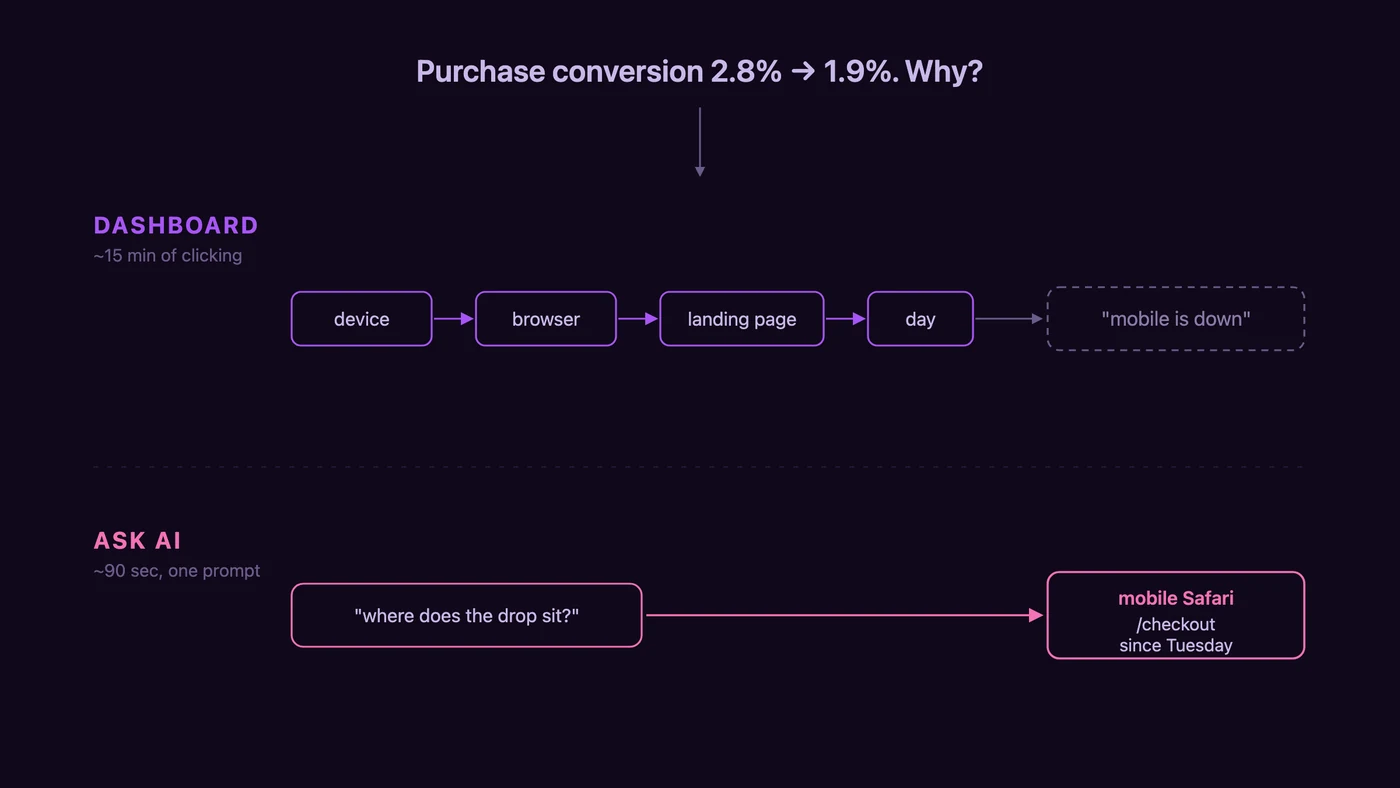
So you do what everyone does. You open Looker Studio, or you start a fresh Exploration, and you begin clicking. Break it by device. Now by browser. Now by landing page. Now day by day. Fifteen minutes later you've learned that mobile is down and desktop is flat, which is real, and also nowhere near an answer. You've spent the time and arrived at "mobile is down," which is the beginning of the investigation, not the end of it.
The dashboard didn't answer the question. It just gave you a slower way to ask it. And here's the trap: the natural next move is to save that segment comparison as a new tile, "in case it happens again." It won't happen again the same way. You've just added the forty-first thing nobody reads.
What "asking AI" actually means here
The version of "ask AI" that's worth anything isn't pasting a CSV into ChatGPT and hoping. It's the AI holding a live connection to your GA4, so it can pull the numbers itself, segment them however the question demands, and hand you back an answer in prose. That connection is a GA4 MCP server — the piece that lets Claude or ChatGPT read your analytics directly instead of waiting for you to export a spreadsheet. Setup is a one-time, no-code thing; connecting GA4 to Claude takes about five minutes and you never touch it again.
Once that's wired up, the "why did checkout drop" question stops being a fifteen-minute clicking session. You type the question the way you'd say it out loud, and the AI does the segmenting for you.
The same drop, both ways
Here's the contrast on one real-shaped problem. A store's purchase conversion rate fell from 2.8% to 1.9% week over week — a 32% drop, the kind that gets a Slack message with too many exclamation marks.
The dashboard path: open the Explorations report, add a breakdown by device, eyeball it, add browser, eyeball it, add landing page, add day. Roughly fifteen minutes of clicking, and the output is "mobile purchases down 34%, desktop flat." True, and not actionable.
The AI path: one prompt — "Purchase conversion dropped week over week. Break the drop down by device, browser, landing page, and day. Tell me where it concentrates and when it started." About ninety seconds later, the answer isn't "mobile is down." It's that the entire drop sits in mobile Safari, concentrated on the /checkout page, and it started Tuesday — which happens to line up with a deploy. Same GA4 data, same underlying numbers. The difference is that one path makes you assemble the story by hand and the other assembles it for you.
If you want the full version of that diagnosis — how to confirm it isn't a tracking change, how to correlate the timing, the exact prompts — that's its own ten-minute conversion-drop playbook. The point here is narrower: for a question you'll ask once, the dashboard is the expensive way to ask it.
Dashboards rot, and you trust them anyway
There's a second cost to the dashboard habit that the "just use both" crowd never mentions. Dashboards break silently.
A filter that was right in March quietly stops matching after you rename an event. A date range hard-codes itself to last quarter and nobody notices. A blended data source joins on the wrong key and inflates a number by 20%. The dashboard keeps rendering. The tile still shows a clean figure in a nice font, and because it's in a nice font, everyone believes it. I've watched a team make a budget decision off a "revenue by channel" tile that had been double-counting a currency for two months. Nothing looked wrong. That's the problem — nothing ever looks wrong on a dashboard.
Asking live data each time doesn't accumulate that debt the same way. There's no saved filter to rot, no stale join to trust. You ask, the AI pulls today's data through the API, you get today's answer. It can still be wrong — the AI can misread a question — but it fails loudly, in front of you, in the same conversation where you can push back. A rotten tile fails in silence, for months.
Where asking AI stops
I'd be selling you something if I stopped there, so here's the honest boundary. An AI reading your GA4 can tell you where a problem sits — the device, the browser, the page, the day. It cannot tell you why the page is failing, because it only sees GA4. It doesn't see that the PayPal button on mobile Safari now takes four seconds to render after Tuesday's deploy. GA4 doesn't record that; nothing in the Data API does.

That's not a knock on the AI — it's the edge of what analytics data can answer, and it's the same edge Google's own GA4 AI Assistant runs into. The AI gets you from "something's wrong somewhere" to "look at mobile Safari checkout since Tuesday" in ninety seconds. Then you open the page on an actual phone and see the four-second button yourself. The dashboard couldn't cross that line either — it just took fifteen minutes to fail to.
So what do you keep?
Keep the dashboard that five people watch. If there's a standing set of numbers your team glances at every week, or a report a client needs emailed, that's a real dashboard doing a real job — leave it alone. Looker Studio is free and good at exactly this.
Kill the rest. The dashboards built to answer a one-time question, the tiles saved "in case," the sprawling report nobody's opened since the quarter it was made — those aren't monitoring anything. They're old questions, embalmed. When one of those questions comes back, ask it out loud to an AI that can read your GA4, get the answer in ninety seconds, and don't build a tile for it. The next question won't be the same one anyway.
FAQ
GA4 dashboard vs AI — which should I use? Use a dashboard for the numbers you check on a schedule and the reports you send to people who won't log in. Use AI for the one-off "why did this change" questions, where you don't know the answer's shape in advance. They're not really competing — a dashboard answers a fixed question on repeat, AI answers a new question once. Most of what people build dashboards for is actually the second kind.
Is Looker Studio still worth it in 2026? For monitoring and client reporting, yes — it's free and does that well. What it's not worth is building it to answer investigative questions. If you keep opening Looker Studio to figure out why a number moved, that's the signal you want AI on your GA4 instead, not another tile.
Can't I just use Looker Studio's built-in AI? Looker Studio Pro has Gemini-powered querying, but it works inside the dashboard on the data you've already modeled there, and the deeper features lean on BigQuery underneath. Connecting a general AI client like Claude or ChatGPT to GA4 through an MCP connector is a different shape — it reads your raw GA4 metrics live and you ask in plain language, no dashboard to build first. See the GA4 MCP server guide for how the two approaches differ.
Do I need to export CSVs to ask AI about GA4? No, and you shouldn't. A CSV is a stale snapshot the moment you export it, and the AI can only see the rows you happened to include. A GA4 MCP connector lets the AI pull live data and segment it however your question needs, which is the whole point. CSV-into-ChatGPT is the slow, blind version.
Does asking AI replace a CRO audit? No. AI on GA4 finds where a conversion problem lives — the page, the device, the step. Naming the on-page cause and fixing it is a different job that needs eyes on the actual page. The AI narrows the search from your whole funnel to one screen; a human closes it.
The next time someone asks you to "build a dashboard for that," ask what question it's supposed to answer. If the answer is "we might want to check on it sometime," you don't need a dashboard. You need to be able to ask.