Docs / Visual proof
How the model actually sees your page
Captures real desktop and mobile screenshots through an anti-bot browser so the model looks at the page instead of guessing from HTML, then records what it observed. On every plan; on Free each capture counts toward the weekly tool calls. Waiting and the first image delivery are included; repeat deliveries use another call.
Signature
cr_capture_screenshotsReal desktop and mobile screenshots through an anti-bot browser, so the model looks at the page instead of guessing from HTML. On every plan; on Free it counts toward the weekly tool calls.cr_get_screenshotsWaits for a capture and returns its images. On Free, waiting and the first ready result are included with the capture; each repeat of a ready result uses one weekly tool call.cr_list_capture_setsThe capture sets a page can be verified against, each with the observables it expects to find.cr_capture_via_web_fetchFetches a URL server-side and returns the HTML body so the model can pull observables out of it.cr_record_verificationSubmits what the model observed on the page and stores it against the hypothesis being tested.
What you ask
- Capture desktop and mobile screenshots of a page and tell me what you can actually see on it: the call to action, trust signals, and anything that would stop someone buying.
What runs
What comes back
Capture desktop and mobile screenshots of a page and tell me what you can actually see on it: the call to action, trust signals, and anything that would stop someone buying.
Capture status. Desktop: captured successfully. Mobile: the plugin did not return a distinct mobile screenshot. Its mobile visual check timed out and reused the desktop capture, so I am not going to pretend I verified the responsive layout. What is actually visible: Main headline — Observed — the first strong page heading is "Top Stories". Supporting value proposition — Not observed above the fold — there is no clear explanation of what the site offers or why someone should shop through it. Navigation — Observed — logo plus Motoring, Watches, Outdoors, Tech, Food & Drink, Style, More, Today in Gear, Shop Smarter, Videos and Sign In. Search — Observed, low prominence — a small magnifying-glass icon in the top-right; there is no visible search field. Primary CTA — Not observed — the homepage has article-level links such as "Read the Story", but no dominant shopping CTA. Trust and social proof — Not observed in the usual commerce sense — no ratings, review counts, testimonials, guarantees or retailer security signals. Editorial credibility — Observed — named authors, dates, categories, recognizable brands and copy saying content is curated by editors. What could stop someone buying: it does not look like a place where you buy anything; the top of the page wastes a lot of space before the first content; there is no above-the-fold value proposition; the strongest commercial banner says "Shop Smarter" but carries no visible button; many images render as solid-colour placeholders, which makes the page look unfinished; sponsored cards resemble editorial ones; and the carousel controls are tiny. Mobile tap usability needs a real mobile screenshot before making a firm claim.
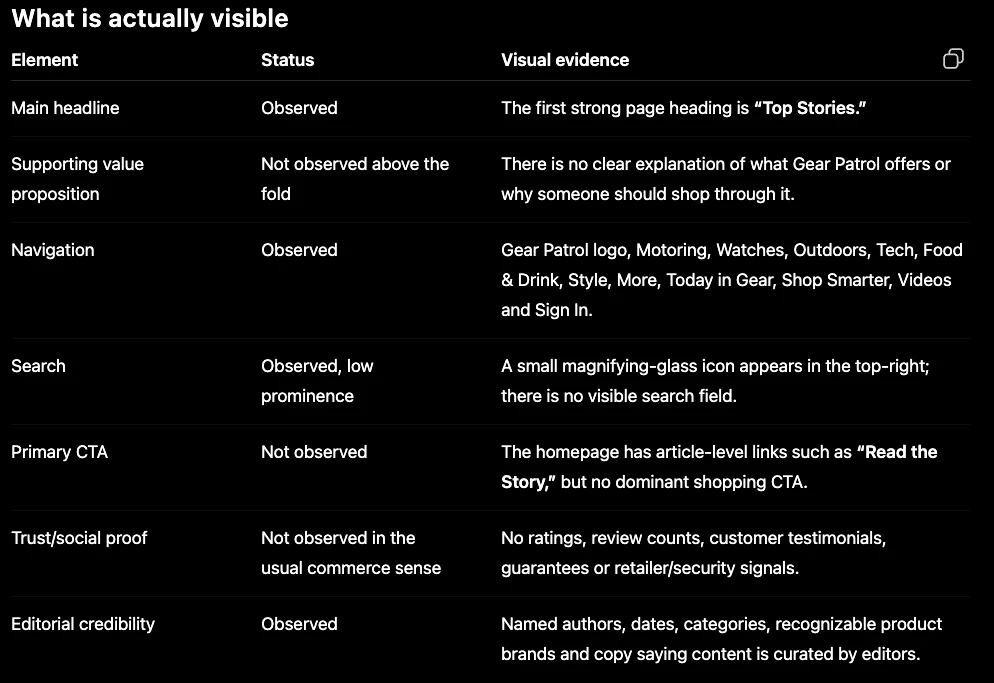
ChatGPT · GPT-5.6 Sol · captured 2026-08-03 · Demo Shop, data window 2026-03-28 to 2026-08-02
When to reach for this
Use this when you need the model to look, not infer
Most page analysis is really HTML analysis: the model reads markup and reasons about what a visitor probably sees. This renders the page in a real browser and hands back the image, so statements about layout, prominence and what sits above the fold are about pixels rather than about the DOM.
Use it to settle an argument about a page
An observed-versus-not-observed table is much harder to argue with than an opinion. When two people disagree about whether the CTA is visible, a capture with a row saying not observed and the evidence beside it ends the conversation.
Not this one for numbers
It sees the page, not the traffic. It cannot tell you how many people bounced off the thing it found. Pair it with funnel leak diagnosis, which tells you the step is leaking, and use this to find out why.
How to read it
The most valuable line in the run is the refusal
The mobile capture timed out, and the answer says so rather than describing the desktop image as if it were mobile. That is the entire point of this instrument. A model working from HTML will happily produce a confident paragraph about mobile experience it never saw; this one draws the line at what came back in the picture, and marks the rest as unverified.
Observed and not observed are both findings
Half the rows in the table are absences: no dominant CTA, no commerce trust signals, no above-the-fold value proposition. Absences are what page checks are for, and they are the hardest thing to get from analytics, which can only tell you that people left.
Read the evidence column, not the status
"Search — observed, low prominence" means something quite specific: an icon exists, a field does not. The status alone would let you tick a box and move on. The evidence column is where the actionable detail lives, and it is written from the capture rather than from an assumption about how sites usually work.
Placeholder images are ambiguous and it says so
Several image areas came back as solid colour blocks. That can mean broken loading for real users, or it can be lazy-loading behaving normally under a headless browser. The run flags the ambiguity instead of resolving it, which is correct: verifying that one needs a human with a phone.
Limits
- It is slow. The run above took just over nine minutes end to end, because the capture is asynchronous: the tool returns a request id and the client polls until the browser has finished.
- Captures can fail or time out per viewport. The mobile capture failed here, and a page-level claim about mobile is not available when that happens.
- Lazy-loaded and scroll-triggered content may not appear in the frame, so an absence in the capture is not always an absence on the live page.
- It reads the page as rendered for an anonymous visitor. Anything behind a login, a geo gate or a cookie wall is invisible to it.
- It describes and interprets. It does not measure: no load times, no conversion figures, no comparison against your own funnel.
Related instruments
Go deeper
Try it on your own data
Every instrument runs on your own GA4, read-only, inside Claude or ChatGPT. One connector covers all of them.
Add the connector → Official ChatGPT plugin →Session captured 2026-08-03 against the ConvRadar demo property. Masked in the image: cropped to the conversation column, so the account sidebar and workspace name are out of frame, no connector URL is in frame, so no token can leak, no account email or avatar is in frame.