If ChatGPT MCP feels slow, the number to know is 60 seconds. That is the default ceiling on a single tool call, and everything odd about using a connector follows from it: why a good server hands you a request id instead of an answer, why the chat sits silent for minutes on some questions and answers others instantly, and why "it's frozen" is usually wrong.
I spent two days running an analytics connector inside ChatGPT against a live GA4 property and timing every run. Ten of them are below with real numbers. Three went wrong, in three different ways, and only one of those was the connector's fault.
Search this and you get server-builder advice: connection pooling, memory leaks, cache your backend calls. Good advice, wrong chair. This is from the other side of the screen, where you did not write the server and cannot profile it, and the only question is whether to keep waiting.
The 60-second ceiling is the whole story
An MCP tool call is a request, and ChatGPT gives up on it after about a minute. That is the whole mechanism. Developers hit this constantly: the OpenAI forum has a steady run of threads titled some variation of request timeout, and the MCP TypeScript SDK carries an open issue about tool calls dying at 60 seconds for long-running requests. Newer FastMCP builds raised their own default to 300 seconds, which helps the server and does nothing about the client sitting in front of you.
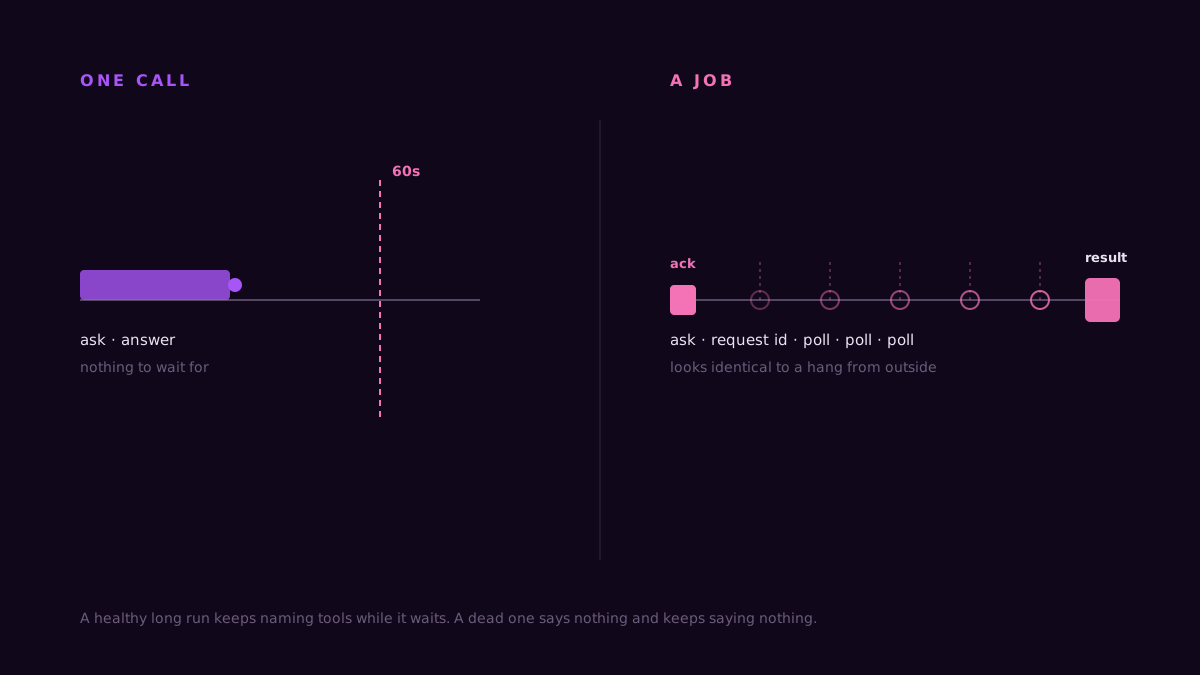
So anything that genuinely takes longer than a minute cannot be one call. It has to be either a sequence of short calls, or a job: the tool returns a request id straight away, and the client polls until the work is done.
From your chair both look the same. The chat goes quiet and stays quiet.
Ten runs, timed
Same connector, same property, same model, same day. The only thing that changed was the question.
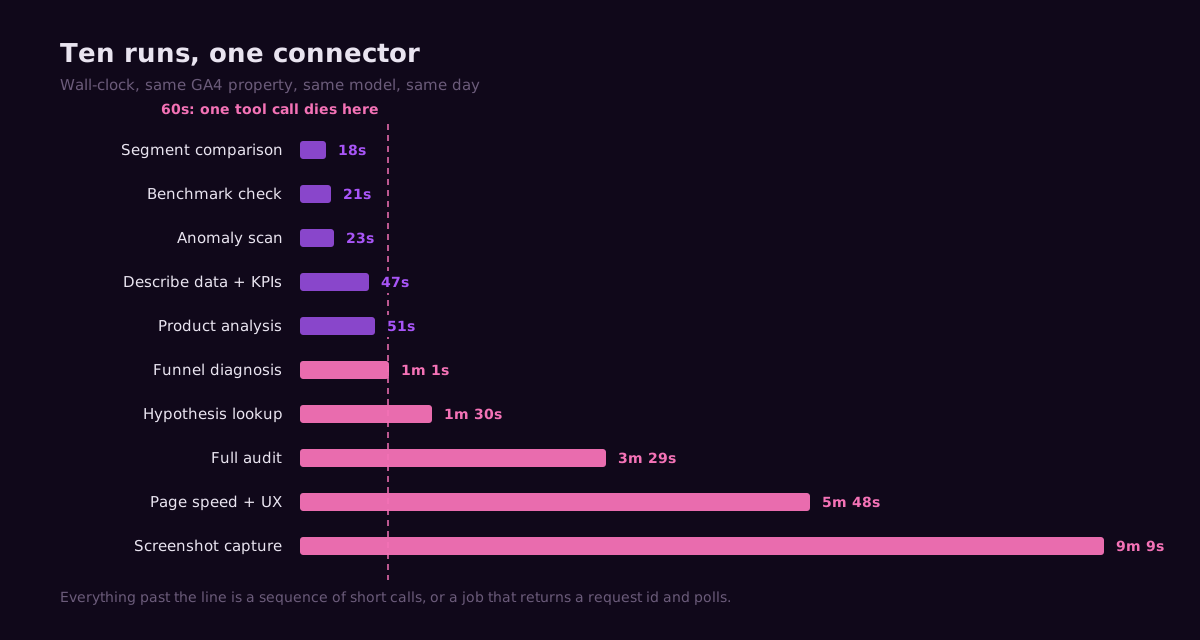
The fast end is unremarkable. A segment comparison came back in 18 seconds, a benchmark check in 21, an anomaly scan in 23. Each of those is one tool call and a paragraph of writing.
The middle is where the shape starts to show. Product analysis took 51 seconds. A funnel diagnosis took 1 minute 1 second, which is already past the ceiling for a single call, so it was several: pull the funnel, find the worst step, split that step by device and source and country. A hypothesis lookup took 1 minute 30 seconds.
Then the full audit: 3 minutes 29 seconds. That one fires KPIs against the prior period, walks the funnel, scans for anomalies, scores traffic quality, checks a benchmark and reads the change log, then ranks what it found. Six or seven calls in sequence, each comfortably under a minute, adding up to something that feels broken if you don't know what's happening.
And the long tail, where the ceiling stops being an inconvenience and becomes an architecture: a page speed and mobile UX check at 5 minutes 48 seconds, and a screenshot capture at 9 minutes 9 seconds. Neither of those could ever be a single call. A real browser has to load the page, render it, and hand back an image. So the tool acknowledges and the client polls, which is exactly what you want and also exactly what looks like a hang.
What the pause is actually doing
Here is a real one, verbatim, mid-run:
The capture is still rendering. I'll poll once more and then report only elements that are actually visible in the returned images.
That is the ack-and-poll pattern narrating itself. Nine minutes later it came back with a table of what it could see on the page and, more usefully, what it could not. If you want to know which calls a given question fires and in what order before you ask it, the instrument docs list the tools behind each one.
The tell for a healthy long run is that the client keeps saying what it is doing. In ChatGPT those lines are grey and easy to scroll past, and they look like this:
Retrieving Account and Traffic Quality Insights
Analyzed conversion funnel leaks and described dataset structure
Polling Heuristic Check Results
Three status lines, three different stages, all from one run. That is the signal to keep waiting. A dead run says nothing at all and keeps saying nothing, and the last thing on screen stays the last thing on screen.
Three ways it actually broke
Only one of these was the server.
The answer became a report. ChatGPT Business and Enterprise accounts have a Work mode with skills like Data Analytics and Sites layered on top. I asked a plain question about a funnel and watched the model decide, out loud, to use the Sites publishing path "to make the analysis durable." It was about ninety seconds from creating a published site in the workspace when I stopped it. The same question in Chat mode answered in the thread in a minute. If your connector answers keep turning into deliverables you didn't ask for, that is the skill layer, not the connector.
A run finished and returned nothing. The page check worked for 5 minutes 48 seconds, completed every tool call, and then produced a heading and no body. No error. Re-running it worked. This is the failure mode worth naming because it looks like success in the tool log and like a bug in the chat.
One leg of a job timed out. During the screenshot run the desktop capture came back and the mobile one did not. What the model said about it is the part I'd want from any tool:
Its mobile visual check timed out and reused the desktop capture, so I'm not going to pretend I verified the responsive layout.
An unverified answer labelled as unverified is a working system. Silence, or a confident paragraph about a mobile layout nobody photographed, would not be.
The setup path moved, and most guides didn't
Worth knowing if you're following instructions written before this summer, including some of mine.
OpenAI renamed Connectors to Apps in December 2025. Then on 9 July 2026 the app directory became the Plugin directory, and a plugin is now the wrapper: it can contain apps, skills and app templates. Apps are still the integrations that reach your data. Plugins are how you find and enable them.
For adding a custom MCP server today, that means Settings, then Plugins, then the MCP tab, then Add server. Any guide that sends you to a Connectors menu is describing a menu that has been renamed twice. The connector itself is unchanged; only the door moved. ConvRadar skips that door entirely: it's an official plugin in ChatGPT's plugin directory, so you open it in ChatGPT and click Connect, with no custom server and no URL. Our GA4 to ChatGPT setup walkthrough has the three steps.
So how slow is too slow
A rough rule from these ten runs.
Under 30 seconds is a single call and there is nothing to think about. Thirty seconds to two minutes is a sequence, and the client should be naming tools as it goes; if it is, wait. Anything past two minutes should be a job, and a job should have told you it was a job. If a run has been silent for three minutes with no tool names and no request id, it is not working, and the fix is almost always to re-run rather than to keep waiting.
The thing that separates a connector worth keeping from one worth deleting is not speed. It is whether the slow parts explain themselves. A server that blocks for four minutes and then errors has wasted four minutes. A server that says "this takes a while, here's your request id, I'll poll" has told you everything you need in the first two seconds.
Picking between the GA4 connector options is a separate question, and I've written up every GA4 MCP server option and who each one suits. The clients behave differently under load too: Claude tends to show its tool calls more legibly than ChatGPT does, which matters more than it sounds when you're staring at a quiet window. That comparison is here.
What I'd check before blaming the connector
Re-run the question once. Roughly a third of the odd behaviour I hit was not reproducible.
Then check which mode you're in. Work mode with skills enabled is a different product from Chat mode, and it will reroute a simple question into something more ambitious than you asked for.
Then ask the connector something trivial, like what date range it can see. If that comes back in five seconds, the connection is fine and the slow question was just expensive.
And narrow the question. "Audit my property" fires six tools; "what is my worst funnel step" fires two. Most of the time people report a connector as slow, they have asked it to do six things and counted it as one.
For the record: the audit that took three and a half minutes came back with 42,879 product views, 861 adds to cart, a 98% drop-off on that one step, and the observation that no changes had been logged so the traffic spikes couldn't be tied to a deploy. Three and a half minutes is a long time to watch a blank screen. It is a very short time to find that.
FAQ
Why does my ChatGPT MCP connector time out at 60 seconds? Because that is the default tool-call timeout. A server that needs longer has to return a request id immediately and let the client poll, rather than holding the connection open.
Is a two-minute pause normal? For a question that needs several tools in sequence, yes. The client should be printing tool names while it works. Silence with no tool names for more than about three minutes is not normal.
My connector answers keep turning into documents I didn't ask for. That is ChatGPT's Work mode and its skill layer, not the connector. Switch to Chat mode for connector questions.
Plugins, apps, connectors: which one do I need? All three words describe the same stack at different levels. You add an app, which is the integration; you find and enable it through the Plugin directory, which replaced the app directory on 9 July 2026. The older word connector still turns up in documentation and means the app.
A run finished but the answer was empty. Is that a bug? It happened once in ten runs here and re-running fixed it. If it repeats on the same question, it is worth reporting; if it happens once, it is worth re-running before you investigate anything else.