
ConvRadar for Shopify
Find out why your Shopify sales dropped.
ConvRadar reads your orders and sessions and names the one thing to check first, inside your Shopify admin. No GA4, nothing added to your theme.
Sessions held. Orders stopped. ConvRadar says where to look.
Look here first · purchases stopped
Purchases stopped on Oct 10 while sessions held at 99% of their usual level. Place a test order and check checkout and payments.
How it works
How ConvRadar works in your Shopify store.
Your Shopify store, your Shopify data, answers inside your Shopify admin. Nothing to connect outside Shopify.
- 01
Install from the Shopify App Store
You run a Shopify store. Install ConvRadar from the Shopify App Store and approve read-only access on Shopify’s install screen: no GA4, no code added to your theme.
- 02
ConvRadar reads your Shopify data
The app imports 90 days of orders, products, stock and Shopify analytics. It usually takes a few minutes, and after that the data refreshes every night at 04:00 store time.
- 03
Ask right inside Shopify
The app opens in your Shopify admin: overview, funnel, traffic, products and Ask AI. Ask in plain English; the answer comes from your store’s own numbers, with the data it read listed underneath.
After you install
Shopify sessions but no sales? The funnel shows the step.
With no past orders, the funnel still shows where shoppers stop: sessions, added to cart, reached checkout, completed checkout. Once Shopify has recorded 100 sessions, the first card names the step that loses the most shoppers. Traffic lists sources and landing pages with their conversion rate.
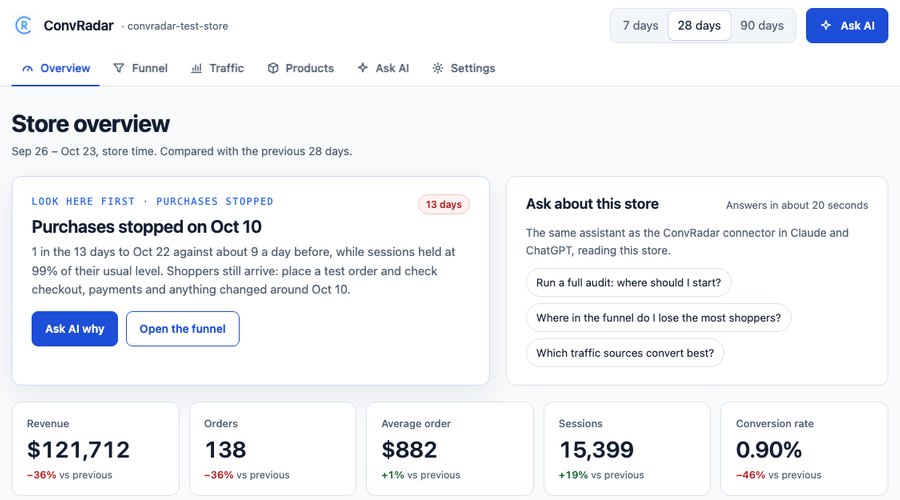
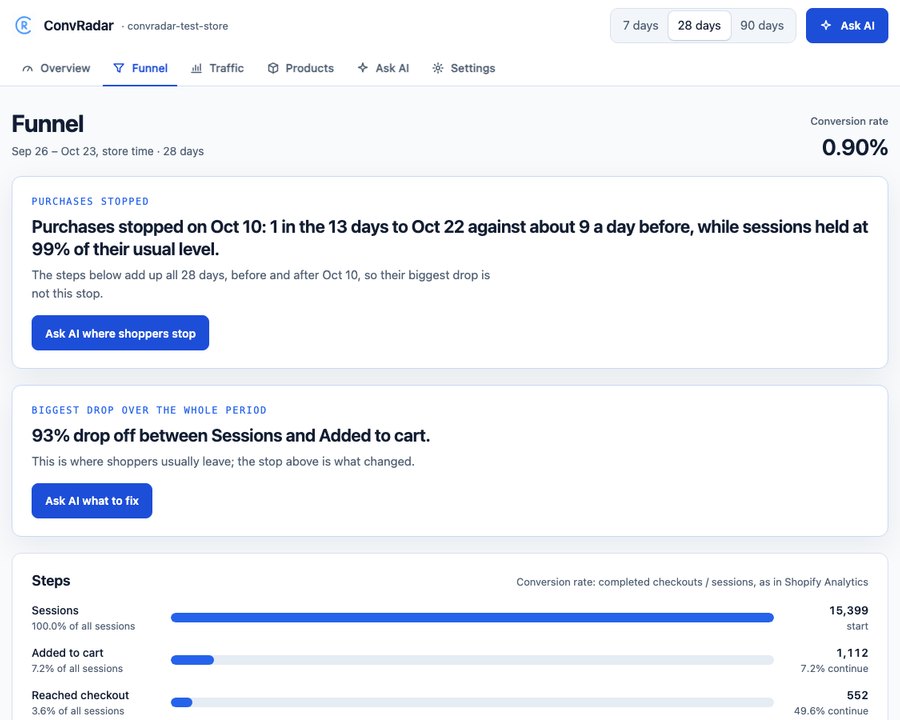
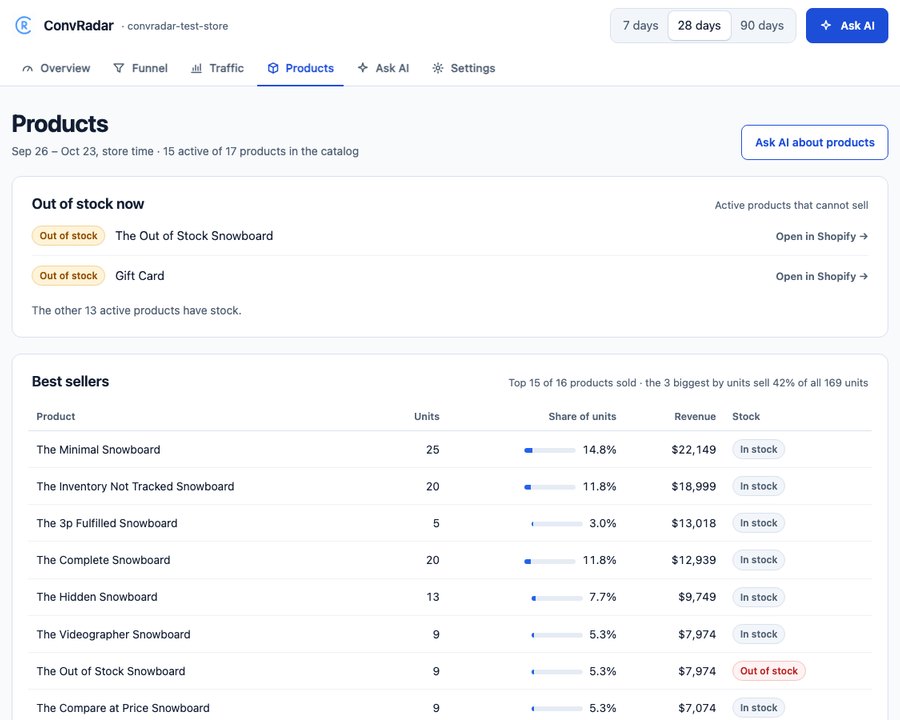
ConvRadar’s own test store, demo data. The same pictures are on the App Store listing.
Ask AI
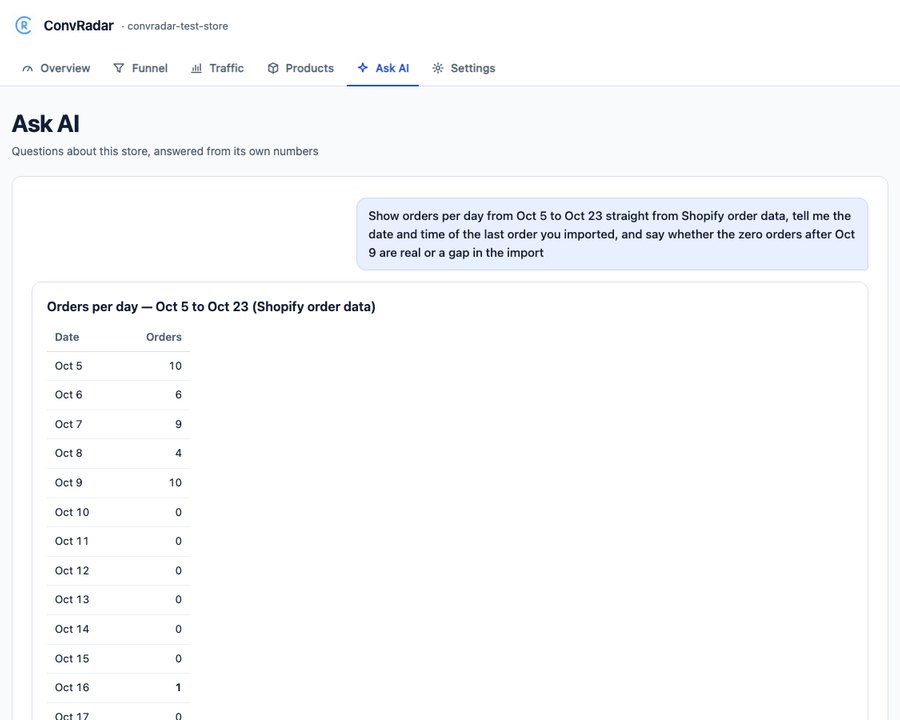
Ask AI about your Shopify store, inside the Shopify admin.
Six questions are one click away. Ask AI answers from the store’s own orders and Shopify analytics, and under every answer it lists the data it read, so each number can be checked in Shopify.
Free: 5 questions per store, in total. Basic: 15 a month. Pro: 60 a month.
- 01Run a full audit: where should I start?
- 02What was my conversion rate over the last 30 days, and what changed?
- 03Where in the funnel do I lose the most shoppers?
- 04Which traffic sources and landing pages convert best?
- 05Which products are out of stock and what do they usually sell?
- 06What can I test to get more shoppers to add to cart?
Data and permissions
Shopify app permissions: 5 read-only scopes, none can write.
The app reads Shopify’s data through these scopes and nothing else. No pixel, script or theme block goes onto the storefront.
| Permission | What it is for |
|---|---|
read_orders | Orders of the last 60 days: totals, discounts, refunds, line items, landing page and source. |
read_all_orders | Orders older than 60 days, for the 90-day history. |
read_products | Product names and status, for best sellers. |
read_inventory | Stock levels, for products that sold out. |
read_reports | Shopify analytics: sessions, added to cart, reached checkout, by day, device, source and landing page. |
What Shopify’s install screen shows
Customer data: name, email address, phone number, physical address. Shopify's analytics API requires the protected customer data permission (names, emails, phones, addresses). ConvRadar never queries or stores those fields.
Also listed: geolocation, IP address, browser and operating system. ConvRadar reads Shopify’s device type (desktop, mobile, tablet) for the funnel. It does not query IP address, location, browser or operating system.
What ConvRadar keeps
Per order: number, dates, totals, discounts, refunds, line items, the landing page, source and UTM of the visit, and the shopper’s language. Ask AI sends a question and the store’s numbers to Anthropic’s Claude API; Anthropic does not train on them.
Stored in the United States, on Supabase (AWS us-east-1). Uninstall stops the sync and deletes the access token at once; Shopify’s delete request 48 hours later removes every row of the store.
Shopify app or GA4 plugin
Shopify analytics without GA4: the app. GA4 in ChatGPT: the plugin.
The two are billed separately: a plan in one does not include the other.
| Compare | ConvRadar app in Shopify | ConvRadar plugin for GA4 |
|---|---|---|
| Answers in | Your Shopify admin | ChatGPT or Claude |
| Reads | Shopify orders, products, stock and sessions, 90 days | One GA4 property: sessions, events, conversions, revenue |
| GA4 | Not needed | Required |
| Price | Free: 5 questions per store, in total. Basic $9.99, Pro $25 every 30 days | Free: 15 answers a week. Basic $5.99, Pro $25 a month |
| Billed by | Shopify | ConvRadar, by card |
| Start | Install from the Shopify App Store | See the ChatGPT plugin →Compare plans → |
App plans
Shopify app pricing: free, then $9.99 or $25, billed by Shopify.
All charges are billed in USD every 30 days, on your Shopify invoice. Change the plan in the app’s Settings, on Shopify’s plan page.
5 Ask AI questions per store, in total.
Overview, funnel, traffic and products.
Nightly import, 90 days of history.
15 Ask AI questions a month.
Overview, funnel, traffic and products.
60 Ask AI questions a month.
Overview, funnel, traffic and products.
Questions
Shopify sales and analytics questions.
In the Shopify App Store since 6 November 2026, 0 reviews so far. That is why this page shows the screens and the permissions before you install.
Why did my Shopify sales drop suddenly?
Four checks cover most sudden drops. Did purchases stop while sessions held: a checkout, payment or discount problem. Did one day move far from the store’s usual level. Which funnel step loses the most shoppers. Did an active product sell out. ConvRadar’s first card runs these four checks on 90 days of your Shopify data and names the one to look at first.
Do I need GA4?
No. The app reads Shopify’s own orders, products, stock and analytics, so a store with no GA4 gets the same screens.
Will it change my store, theme or speed?
No. The app has 5 read-only permissions and adds no code to your theme or storefront, so the store loads as it did before.
What happens after I click Install?
Shopify shows its install screen with the data access list. The app opens in your admin and imports 90 days of orders, products and Shopify analytics; the first numbers appear when that import finishes. After that it refreshes every night at 04:00 store time.
Why do Shopify Analytics and GA4 show different numbers?
Sessions are visits by people, not bots, from Shopify analytics, and conversion rate is completed checkouts divided by sessions, the rate Shopify Analytics shows. Orders count every sales channel without cancelled ones. Revenue is after discounts, with tax and shipping, before refunds, so in a week with refunds it reads higher than Shopify’s Total sales. GA4 counts sessions and purchases its own way, so its numbers differ from Shopify’s. Why GA4 and Shopify disagree.
Why does my Shopify store get sessions but no sales?
With no past orders the app cannot name the day purchases stopped, so it shows where shoppers stop: sessions, added to cart, reached checkout, completed checkout, by device. Once Shopify has recorded 100 sessions, the first card names the step that loses the most shoppers.
Bots inflate my sessions. Does the funnel count them?
The funnel counts the sessions Shopify Analytics marks as human; the sessions Shopify flags as bots are left out. ConvRadar adds no bot filter of its own, so a bot that Shopify counts as human stays in the numbers.
Which stores does it work on?
The app checks no Shopify plan. One install covers one store with its own ConvRadar plan, and amounts are in the store’s currency. An agency with 5 client stores installs it 5 times. A store with no Shopify sessions yet sees orders and revenue, and the sessions tile reads "Not measured yet".
How do I change or cancel a plan?
Settings in the app opens Shopify’s plan page. Shopify bills the plan every 30 days in USD, on the same invoice as your Shopify plan.
Does the AI learn from my store’s data?
No. Ask AI sends your question and the store’s numbers to Anthropic’s Claude API, without customer names, emails, phones or addresses, and Anthropic’s Commercial Terms do not allow training on this data. Subprocessors.
What happens to my data if I uninstall?
Sync stops and the access token is deleted at once. Shopify sends a delete request 48 hours later and every row of the store goes; if that request never comes, the store is deleted after 30 days.
Start
See the biggest loss in your Shopify funnel.
The first card appears when the 90-day import finishes. After that the app refreshes every night.