Google's help page for the Checkout journey report contains both halves of the bug. The requirement: add_shipping_info, "which populates the Add shipping step". Four paragraphs on, the platform note: "Shopify automatically collects the begin_checkout, add_payment_info, and purchase events after you set up Google Analytics on your Shopify store. In addition to these events, you must also set up the add_shipping_info event to get the data required for this report."
Three of four arrive on their own. The fourth is step two. And the funnel is closed: "it includes only users who began at the first step (the Begin checkout step) and didn't begin at another step in the funnel." A closed funnel carries a user forward only through steps they completed, so a step nobody completes is a wall, and everything behind it reads zero.
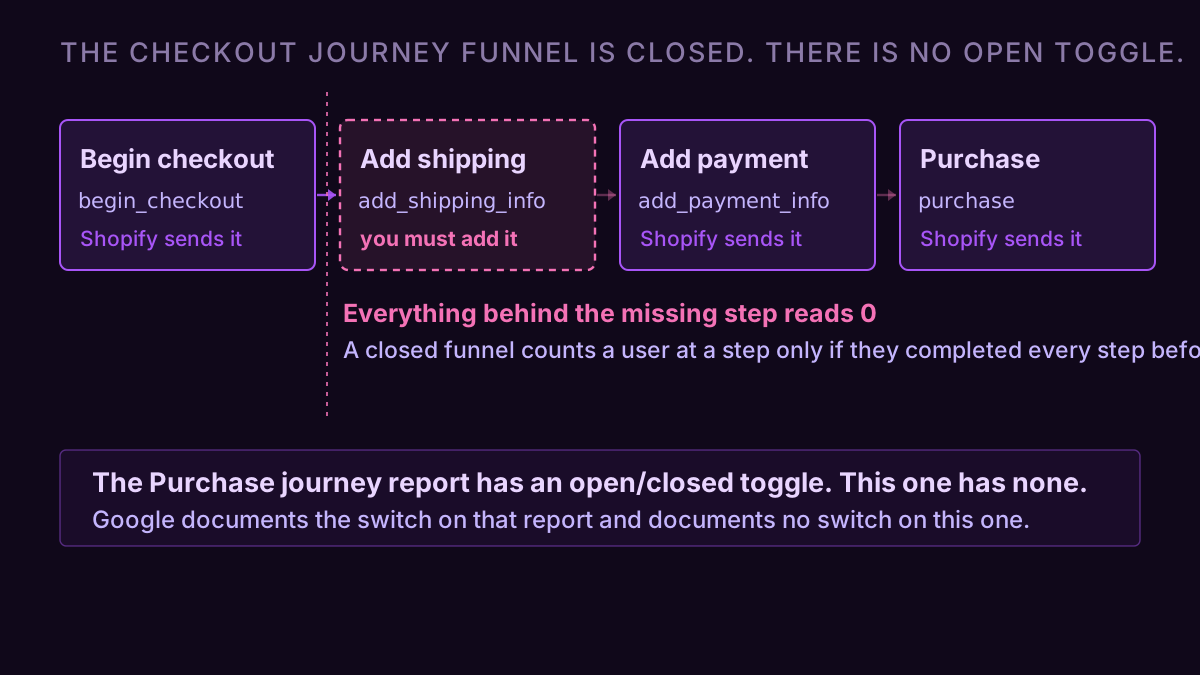
The Purchase journey has an escape hatch. This one does not.
The Purchase journey, the other built-in ecommerce funnel, runs session_start, view_item, add_to_cart, begin_checkout, purchase, and Google documents a switch on it: "By default, the Purchase journey funnel is closed. However, you may optionally toggle the switch above the funnel to set the funnel to an open funnel. An open funnel allows users to enter at any stage."
The Checkout journey page documents no such switch. It states the funnel is closed and stops. So the report most likely to break on the most common ecommerce platform is also the one with no lever to un-break it.
That asymmetry is why the two reports fail differently on the same property. Miss view_item and the Purchase journey is recoverable in one click. Miss add_shipping_info and the Checkout journey has nothing to offer you at all.
What the report shows while the store is taking orders
A Shopify store on the default Google & YouTube channel, 30 days, no custom tagging:
| Checkout journey step | Users | Abandonment |
|---|---|---|
| Begin checkout | 2,940 | 100% |
| Add shipping | 0 | |
| Add payment | 0 | |
| Purchase | 0 |
Shopify admin, same window: 214 orders, $17,120. GA4's own Monetization overview, same property, same window: 214 purchases, $17,120. The purchase event fires and lands perfectly. It just never appears in this funnel, because the closed funnel dropped all 2,940 users at step two and there is nobody left to arrive.
Abandonment rate here is not an opinion. Google defines it as "the percentage of users you lost between the current step and the next step in a funnel". Between 2,940 and 0, that is 100%, calculated correctly, from data that is wrong.
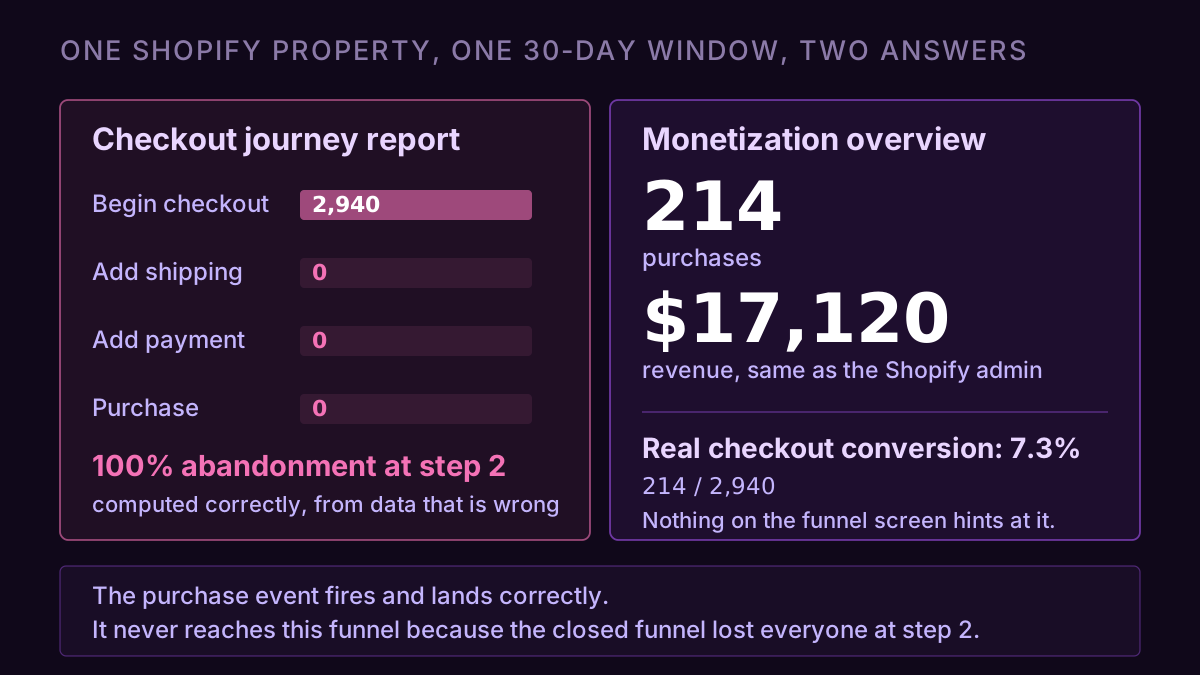
The real checkout conversion rate on this property is 214 ÷ 2,940, or 7.3%. Nothing on the funnel screen hints at it.
Two other things empty this report, and the zero tells you which
Thresholding suppresses rows rather than shrinking them. On a property with Google signals on and low traffic, GA4 withholds data that could identify individuals, and a report can come back blank with every event present and correct. The tell is the data-quality icon at the top of the report, and the same window read through an exploration with signals off. Four edits GA4 makes after collection covers what that icon is telling you.
Redirect wallets split the journey. PayPal, Klarna and Afterpay take the buyer off-site and bring them back, and the return can open a new session, so begin_checkout and purchase land in different ones. This report counts users rather than sessions, so it survives better than a session-scoped funnel would, but a chunk of buyers still return as a source GA4 treats as new.
The discriminator is the shape of the number. An exact 0 at a step, on a property with traffic, is an event that does not exist. A number that is present but lower than the store's own count is a measurement problem: thresholding, session splits, consent, ad blockers. Zero and small are different diagnoses, and the first one is the only one you fix in Tag Manager.
Nobody can tell you which events your store sends
Search for Shopify's GA4 event list and the sources disagree with each other. Google's help page says the native setup collects three of the four checkout events and that you add add_shipping_info yourself. Practitioner write-ups of the same integration list add_shipping_info among the events that fire natively, and put refund, view_cart and remove_from_cart in the missing column, with the honest note that the last two are "not confirmed in Shopify docs".
Both can be true across different app versions, themes and checkout-extensibility states. Which makes every published list, including the one you are reading, a starting hypothesis rather than an answer about your property.
The property itself is the only authority. Admin → DebugView with a test order, or Reports → Engagement → Events for a 30-day window, and read which of the nine recommended ecommerce events have a non-zero count: view_item_list, view_item, select_item, add_to_cart, view_cart, begin_checkout, add_shipping_info, add_payment_info, purchase. Note that an event first received less than 48 hours ago appears only in Realtime, so a same-day check on a fresh tag reads as absent when it is merely new.
Each absent event takes a specific question with it
An event that was never sent is not a gap in a chart. It is a question that silently returns the wrong answer for as long as the property exists.
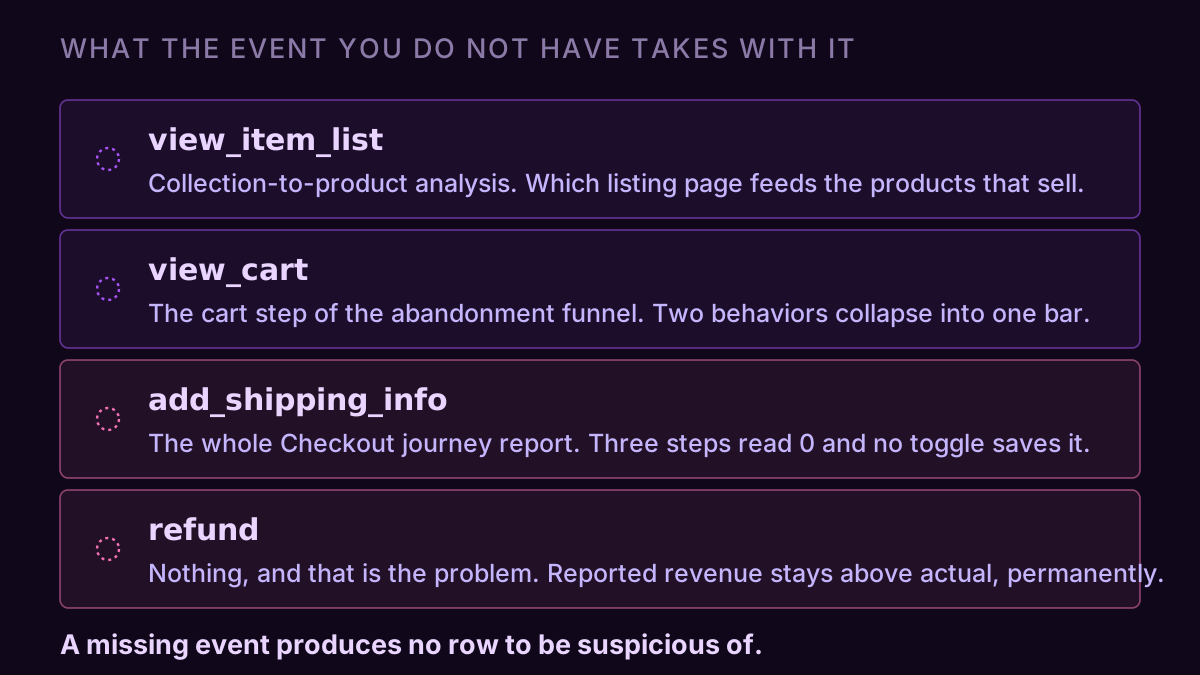
view_cart is the one people miss quietly. Without it, the cart is not a step in any funnel you build, so the drop between adding to cart and starting checkout collapses into one bar that mixes two behaviors: people who never returned to the cart, and people who saw the shipping cost and left. The six-step abandonment funnel needs that step to separate them, and it will build without complaint on a property that cannot fill it.
refund is the one that costs money. Shopify nets returns out of its own numbers; GA4 keeps the original purchase forever unless a refund event arrives. Reported revenue stays above actual revenue by the return rate, permanently, and Smart Bidding optimizes toward the inflated figure. That gap is one axis of why GA4 and Shopify disagree about the same week, and the only axis that never closes on its own.
add_to_cart sets the denominator under every cart-rate comparison. Missing or partial, and the add-to-cart benchmark you are measuring against is arithmetic on a number your property never collected.
Two fixes, and they are not equivalent
Send the event. add_shipping_info needs a dataLayer push at the shipping step and a GA4 event tag in Tag Manager, and on checkout-extensibility stores a Customer Events pixel instead. Once it fires, the Checkout journey report fills in on its own from that date, with no backfill. The thirty days you already lost stay lost.
Or stop using that report. A custom funnel exploration reproduces the same four steps and lets you set it open, so begin_checkout → purchase reports the 7.3% while shipping and payment sit there empty and honest. Take this one first: the built-in report gives nothing the exploration cannot, and the exploration does not depend on an event that needs a developer.
Neither fix touches the historical hole. Any month you quote from that funnel, before the event started firing, is a month where the report said zero and the bank said otherwise.
The check worth keeping
Four things settle it on any property. Which of the nine recommended ecommerce events have a non-zero count over 30 days. Whether purchase in Monetization matches the store's own order count for the same window. Whether the Checkout journey's first step has a non-zero step behind it. And whether refund has ever fired, which for most stores is a one-word answer.
That is an afternoon of clicking, or one question through a connector. We built ConvRadar as a hosted GA4 MCP server so this class of question, arithmetic across three screens where the answer is which rows do not exist, comes back as a sentence. The prompt: "List every ecommerce event my property received in the last 30 days with its event count, then tell me which of the nine GA4 recommended ecommerce events are missing and what each missing one makes unanswerable."
Sampling, thresholding and the (other) roll-up all have names, documentation and a body of writing behind them. The event that was never sent has none of that, because it produces no row to be suspicious of. The report renders, the chart draws, the abandonment rate computes to a clean 100%, and every part of that is working exactly as designed.