41 of 68 GA4 properties that record a conversion (60%) count something besides that conversion as a key event, or never count the conversion at all, measured on properties connected to ConvRadar between 19 September and 16 October 2026. Each of the 68 has 1,000 or more sessions and 28 days of data in the window, and each was checked against its own real conversion, labelled from its events and its live site. Key events are what GA4 called conversions until March 2024, and the counts come from GA4's own event data.
On 27 of the 47 GA4 properties whose conversion is an online purchase (57%), GA4 also counts another event as a key event, and on those 27 the Key events column holds a median 62 key events per purchase. On 4 of the 21 GA4 properties whose conversion is a lead, a booking or a signup (19%), the conversion fires and GA4 never counted it as a key event in the 28 days.
What share of GA4 setups count the wrong conversion?
The 41 are 27 online-sales properties that count extra events next to the purchase, 10 lead, booking and signup properties that count extra events next to the lead, and 4 lead properties that never count the lead. The comparison is with each property's own conversion, not with a checklist, so form_submit as a key event is right on a site whose form is the lead and wrong on a site where the form is a newsletter box. Some of the 27 mark add_to_cart on purpose so Google Ads can bid on it; event data cannot tell those from accidents, and GA4's Key events column counts the step either way. 27 of the 68 count exactly their conversion and nothing else.
Why GA4 counts more key events than purchases
GA4 marks purchase as a key event by default on web properties, according to Google's help page on key events, and purchase is a key event on 46 of the 47 online-sales properties; the 47th is an app that counts in-app purchases. The same page says that with Ads Personalization on and a Google Ads account linked, GA4 also marks add_to_cart, add_to_wishlist, begin_checkout, session_start, view_item, view_item_list and view_search_results. If that list were the source, session_start, which fires in every session, would be a key event too. It is a key event on 2 of the 27 properties that count extras.
21 of the 27 count a funnel step such as add_to_cart or begin_checkout, 6 count page_view, session_start, first_visit or scroll, 3 count an event named ads_conversion_Shopping_Cart_1, and 4 count a contact or app event such as a WhatsApp click or a chat start, with some properties in more than one group. Google Ads can create conversions directly from GA4 key events, which is how an add-to-cart key event reaches a bidding strategy. Inside GA4 the cost is the same either way: every report with a Key events column, and the session key event rate, the share of sessions with any key event, count the step as a conversion.
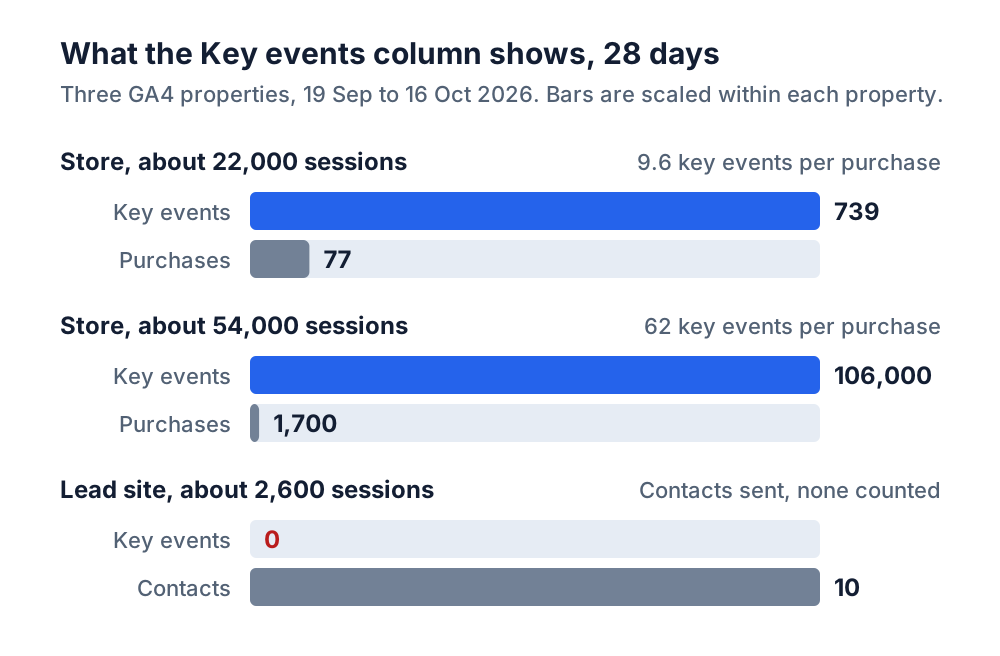
A store with about 22,000 sessions in the window took 77 purchases and logged 662 add-to-carts, with both events marked as key events. Its Key events column reads 739 for the 28 days, 9.6 per purchase, and its session key event rate is the share of sessions with an add-to-cart or a purchase. A second store, about 54,000 sessions, marks page_view next to add_to_cart, begin_checkout and purchase: 106,000 key events against 1,700 purchases, 62 per purchase, and every session that loads a page counts as a session with a key event.
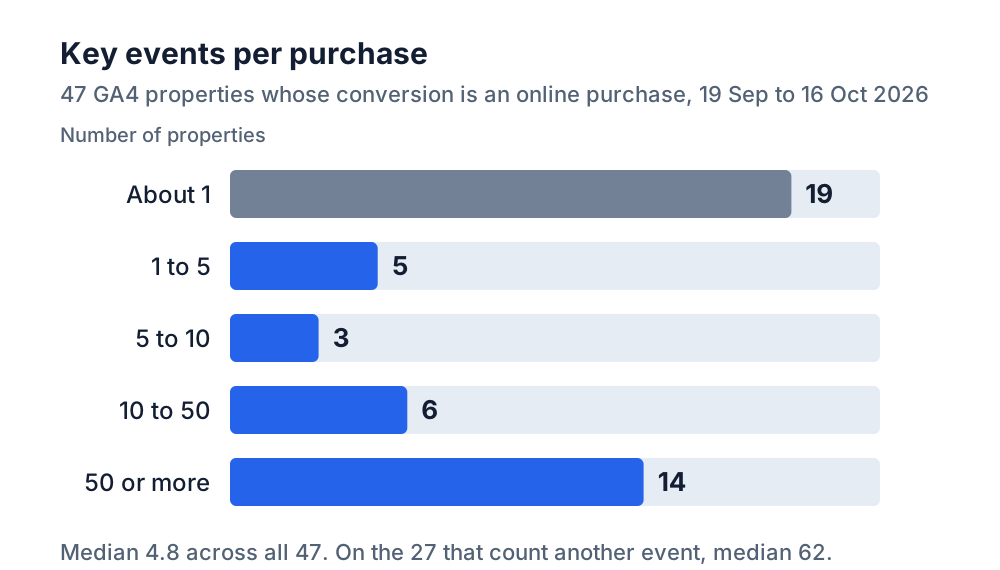
Across all 47 online-sales GA4 properties the median is 4.8 key events per purchase between 19 September and 16 October 2026, 14 of the 47 (30%) sit at 50 or more, and 19 sit at about 1. A session key event rate built on that column does not compare with an ecommerce conversion rate benchmark, which divides purchases by sessions. A store that marks add_to_cart is reading its add-to-cart rate against a purchase-rate band.
Lead generation sites: 21 properties, 20 event names
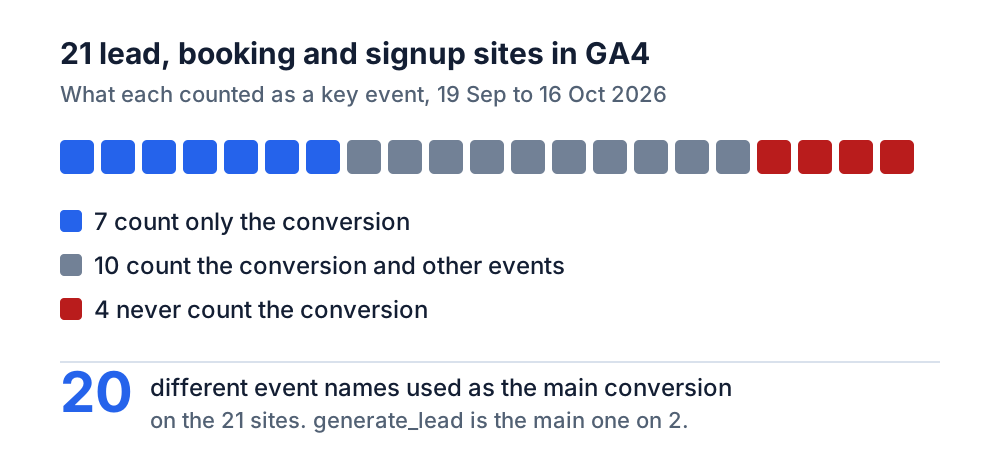
The 21 GA4 properties whose conversion is a lead (15), a booking (5) or a signup (1) use 20 different event names as their main conversion. generate_lead, form_submit and sign_up, the names a tool looks for first, are the main event on 2 of the 21 and appear anywhere in the conversion on 5. The other main names come from whoever set up the tag, after the form plugin or the call tracker, in English, Spanish, French and Chinese, and GA4 treats form_submission and Form_Submission as two names. On 17 of the 21 more than one event fired for the same conversion, and on 9 of the 21 one of them is a call or messenger click, which is why a lead count that reads only the form runs short. Booking sites split too: of the 5 properties typed as booking sites, 2 send the booking as purchase and 3 under an event named for the booking.
ConvRadar's own lead picker has the same blind spot. It looks for those three names unless the owner names the event at setup, so on a custom-named site it finds nothing or settles on a step that fires before the lead. This count started as the check on that picker.
4 of the 21 lead, booking and signup properties send their conversion and GA4 never counted it as a key event in the 28 days: 3 show 0 key events for the whole window, and the fourth shows 2, from a page visit. A lead generation site with about 2,600 sessions logged 7 email clicks, 2 call clicks and 1 form in those 28 days, none of them marked, so GA4 reports a session key event rate of 0% of sessions for a month with 10 contacts. 10 of the 17 that do count their conversion (59%) count other events too: image and slider clicks, button and map clicks, contact-page views, booking steps that come before the booking, a newsletter signup, session_start. On those 10 the median is 8.7 key events per conversion.
11 properties with no conversion event
11 of the 79 GA4 properties in the set record no conversion event of any kind in the window. 3 are online stores on both reviewers' reading, with 2,000 to 18,000 sessions and no purchase event; 2 of those log add-to-carts and between 61 and 131 started checkouts in the 28 days with no purchase behind them. 3 are media sites with nothing to convert, and the reviewers split on the type of the other 5 or left it open. A store without purchase in GA4 reads a conversion rate of zero in every report, and a checkout hosted on another domain without cross-domain measurement or a purchase tag sent only to an ad platform fits that shape. The event data cannot say which.
How to check your own key events
Open Explore → Free form and set the last 28 days. Under Variables, press + next to Dimensions to add Event name, and + next to Metrics to add Event count and Key events; drag Event name into Rows and both metrics into Values, then sort by Key events. Every row with a number in Key events is something GA4 counts as a conversion. Add those up and divide by the count of your real conversion event, purchases for a store and the form, call and booking events by name for everyone else. At 1, the Key events column means what it says. Above 1, the rows above your conversion say what else is in it.
Then read the same table from the bottom. A form, call or booking event with a large Event count and an empty Key events cell is happening, and GA4 is not counting it. If you do not know which event your form sends, submit it yourself with the Realtime report open and watch the Event count by Event name card.
Marking and unmarking happen in Admin → Data display → Events, with the Mark as key event toggle on each row. A change applies from the day it is made: Google's help page says marking an event "doesn't change historic data", so every comparison across that date mixes two definitions, and a drop in key events after a cleanup is the cleanup. Before unmarking add_to_cart, open Google Ads at Goals → Conversions: an imported GA4 action set to Primary steers bidding, a Secondary one only reports. A Primary add-to-cart stays a key event, and GA4 is then read per event name, never by its Key events total. Unmarking begin_checkout does not stop it firing, and GA4's checkout journey report needs begin_checkout, add_shipping_info, add_payment_info and purchase whether they are key events or not.
A cleanup splits your history on the day you make it. Connect GA4 to ConvRadar and ask Claude or ChatGPT on which day in the last 90 add_to_cart started or stopped counting as a key event, and how many purchases came in on each side of that day; on a lead site, name your form and call events and ask the same of them.
The 79 GA4 properties are every property connected by an outside client and active on 17 October 2026 with 28 days of data and 1,000 or more sessions between 19 September and 16 October 2026, 7.7 million sessions in all; ConvRadar's own and demo properties and Shopify connections are excluded, and the one app among the 47 is counted on its in-app purchases. Each property's real conversion and business type were labelled from its event names, volumes, thank-you paths and live site by two independent reviewers, Claude models with different instructions. They agreed on the conversion for 76 of the 79 and on the type for 67; 2 of the 3 conversion disputes were settled by checking the site in a browser and 1 by the author. The reviewers saw which events GA4 already counted as key events, which pulls their labels toward GA4's list, so if the 41 is biased, it is biased down. "Counted as a key event" means GA4's Data API reported at least one key event for that event name in the window, so an event marked or unmarked partway through counts.
Divide your Key events column by your real conversions. On 41 of 68 properties that number is not 1, and nothing in GA4 says so.