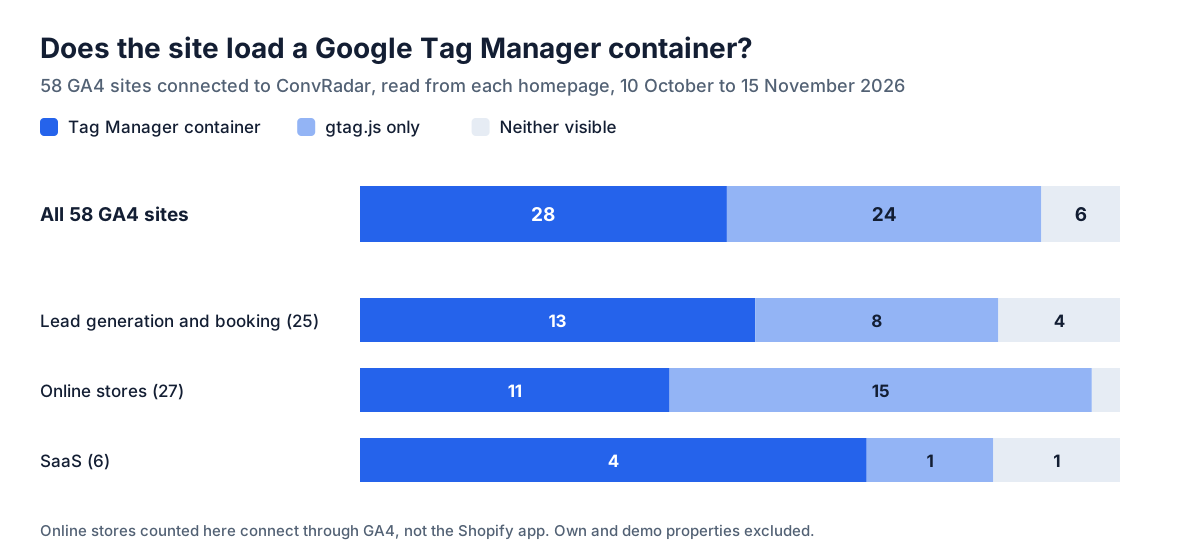
ChatGPT and Claude change a Google Tag Manager container only through a connector that holds your Google grant for Tag Manager; without one, they write the steps and the code and you build the tag yourself. With a connector, the line that matters is whether it gives the chat a publish tool. Google's tagmanager.publish scope makes one possible, and a connector that exposes it lets a yes typed in the chat put a tag live on every page of the site. A connector without one leaves each change as a saved version until a person presses Publish. And the site has to load a container first: 28 of 58 GA4 sites connected to ConvRadar show one in their homepage source, read between 10 October and 15 November 2026.
What ChatGPT and Claude do with Tag Manager without a connector
Without a connector, both assistants work from what you paste into the chat. They say which trigger type a click needs, write a Custom HTML tag or a dataLayer.push, and you build it in Tag Manager by hand. Nothing in the container changes. The assistant also cannot see what the container already holds or what GA4 already counts, and that gap decides whether the new tag is useful or a second count of the same click.
Which Tag Manager MCP servers can publish from the chat
Google splits Tag Manager access into seven OAuth scopes, and a connector asks for some of them on its Google sign-in screen.
| Google scope | What an assistant holding it can do |
|---|---|
tagmanager.readonly | read accounts, containers, tags, triggers and versions |
tagmanager.edit.containers | create, change and delete tags, triggers and variables in a workspace |
tagmanager.edit.containerversions | save a workspace as a container version |
tagmanager.publish | make a version live on the site |
tagmanager.delete.containers | delete containers |
tagmanager.manage.users | change who has access to the account |
tagmanager.manage.accounts | manage the Tag Manager accounts themselves |
The three hosted Tag Manager MCP servers for ChatGPT and Claude with public tool lists put publishing inside the chat. Markifact lists gtm_publish_version among 60 write tools, each held for the user's approval before it reaches Google, and its sign-in also asks for account management (Markifact, 23 July 2026). PaidSync lists 39 Tag Manager tools including publish_gtm_version and revert_gtm_version, and the assistant publishes only when asked (PaidSync, updated 22 May 2026). Stape's hosted server lists 20 Tag Manager tools, and a June 2026 guide describes its version tools as creating and publishing versions (mcp.directory). With all three, going live is one more tool call in the same chat as the request.
ConvRadar's connector has four Tag Manager tools and no publish tool. Two only read: cr_get_tag_manager lists what the live container sends, and cr_check_tag says whether an event reached GA4 realtime after Publish. cr_draft_tag turns a sentence into a diff and writes nothing to Tag Manager. cr_create_tag writes exactly that diff into a ConvRadar workspace and saves it as a version; existing tags are never edited or deleted. ConvRadar's grant asks for tagmanager.readonly, edit.containers, edit.containerversions and tagmanager.publish, plus analytics.edit for GA4 Admin, and never for deleting containers or managing users or accounts. The publish scope is used by two clicks in History on the property's tracking page on convradar.com, Publish and Rollback, and Publish refuses when a newer version has gone live in Tag Manager since ConvRadar built its own, instead of overwriting it. That grant is a separate Google consent from the read-only GA4 connection. The four tools run in Claude's ConvRadar connector and in the chat on convradar.com; ConvRadar's published ChatGPT app gets them after OpenAI reviews the update (November 2026).
Check one: does the site load Tag Manager at all
48% of 58 GA4 sites connected to ConvRadar (28) showed a Google Tag Manager container in their homepage source between 10 October and 15 November 2026, and 41% (24) showed only the gtag.js snippet. Lead generation and booking sites show a container on 13 of 25, online stores on 11 of 27, SaaS on 4 of 6. The other 6 showed neither while sending data to GA4, so a source read misses some installs. Among the 1,000 most-visited domains, 88% of the homepages whose loader could be read (145 of 164) used a container (Mark Studios, 29 October 2026), and 63% of 3,205 B2B SaaS sites load one (TagManifest, April 2026).
On a gtag.js site there is no container on the page for a Tag Manager connector to write into, and a tag written into any other container in your Google account never runs on that site. Two ways out: install the container first, or build the event in GA4 itself, with Create event under Events in GA4 Admin, from an event the site already sends, such as a page_view whose page location contains /thank-you. That works from the day it is saved forward. A button click on a gtag.js site needs the container or a gtag('event') line in the site's code.
Check two: is the event already tracked
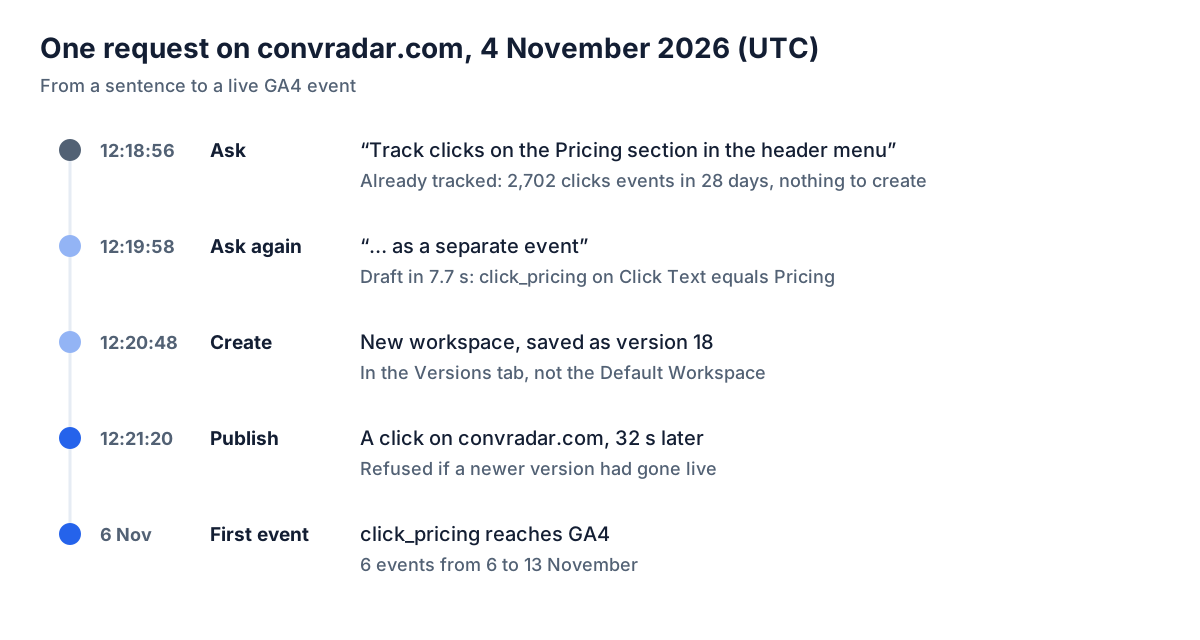
The container shows tag names, and whether those tags fire is in GA4, in the Events report with a count for every event name. On 4 November 2026 the request "Track clicks on the Pricing section in the header menu" went to ConvRadar's chat for convradar.com and came back with nothing to create: 2,702 clicks events in the previous 28 days from a tag called Ga4-event-click that fires on every click, and 336 LinkClick events from a second tag on every link, Pricing included in both. A search of the container for "Pricing" finds nothing. A named event was still worth having for one clean line in reports, so the next request asked for one.
A minute later, "as a separate event" came back as a diff: one trigger, any click where Click Text equals Pricing, and one GA4 event tag, click_pricing, sent to the site's own measurement ID. The draft also said what the tag would get wrong. The header link has no unique selector, so matching on its text counts the footer's Pricing link too.
Where the tag lands, and the first one I could not find
An hour earlier the same morning, the first tag created this way, a YouTube completion event on the homepage, went missing. I opened the Default Workspace, saw zero changes, decided nothing had been written and asked for the same tag again. The second Create was refused: version 17 was already in the container, waiting for Publish. ConvRadar writes into a workspace of its own named after the fix and saves it as a version, so the change sits in the Versions tab, with the rollback written into the version notes ("Rollback: publish version 16"). The Default Workspace shows nothing.
The Pricing tag took the same path. Version 18 was saved at 12:20:48 UTC and published by a click at 12:21:20. The first click_pricing event reached GA4 on 6 November, and 6 arrived from 6 to 13 November.
Ten days, zero video events, zero plays
The video tag went live at 11:43 UTC on 4 November, and GA4 shows 0 video_complete events from 4 to 13 November. It also shows 0 plays: the site's own demo_video_play event last arrived on 31 October. Zero completions on zero recorded plays says nothing about the tag yet. The homepage loads nothing from YouTube until a visitor presses play, so the open question is whether the trigger sees a player that appears after a click, and Tag Manager's Preview mode with the video played to the end answers it. Ten days in, I still have not run that test. ConvRadar marks a created tag confirmed once its events reach GA4 after Publish; the Pricing tag has that mark, the video tag does not. A new event is also one more name in GA4, and whether it counts as a conversion is a key event setting, where 41 of 68 properties count something besides the conversion.
Setting it up in Claude
Connect GA4 to Claude through ConvRadar, then ask for the tag in your own words, naming the page and the button text. The first reply carries an Allow link, the separate Google consent for Tag Manager and GA4 Admin edits. Pausing edits in Account → Google access stops ConvRadar from using it; Remove from Google in the same place stops GA4 reading too, because Google treats the read and edit grants as one app. Drafts cover clicks, form submits, thank-you pages, scroll depth, time on page, YouTube plays and dataLayer events, sent as a GA4 event or a Google Ads conversion; Custom HTML and tags for any other vendor are refused. Free gets 3 drafts in any 24 hours, Basic and Pro 20.
Once Tag Manager is allowed, the reply to "track the signup button" says already tracked, with the 28-day count from your own GA4, or shows the exact trigger and tag it would create before anything is written.
A publish tool in the chat turns a yes typed between two other questions into a deploy. Keep the Publish click outside the chat, and call a tag done when its events are in GA4, not when the version goes live.