A GA4 tracking plan template is a table with one row per action you want counted and seven columns: priority, event name, when it fires, parameters, key event or not, what GA4 records for it today, and who adds it. The today column comes from your own Events report for the last 28 days. On my own site it turned 6 of the plan's 8 rows into changes to names GA4 already receives, and 2 into new events. 19 distinct event names reached GA4 on the median of 114 properties connected to ConvRadar from 19 October to 15 November 2026, and 373 of the 2,568 names those properties sent (15%) fired fewer than 10 times in the 28 days.
The template: seven columns per row
| Column | What goes in it | Example row (constructed) |
|---|---|---|
| Priority | P1 when a decision or an ad bid depends on the row this month, P2 when a report does, P3 for the rest | P1 |
| Event name | lowercase snake_case, Google's recommended name where one exists | generate_lead |
| When it fires | the moment, in words a developer can test: page, element, confirmation | The /contact form is sent and the thank-you message shows |
| Parameters | what you will split or filter by; a value never goes into the name | value, currency, lead_source |
| Key event | yes for an outcome you report or bid on, no for a click or a page on the way to it | yes |
| Today in GA4 | the 28-day count from the Events report, under every name that means this action | 212 as form_submit, 0 as generate_lead |
| Who adds it | Tag Manager, the developer, or a GA4 Admin setting | Tag Manager |
Download the template as a CSV file with these seven columns and starter rows for a store, a lead site and a SaaS product.
Event names are case sensitive, so my_event and My_Event are two events, and a name starts with a letter and holds only letters, numbers and underscores (Google, event naming rules). A name runs to 40 characters, an event carries up to 25 parameters with values up to 100 characters, and web streams have no cap on distinct event names while app streams stop at 500 (Google, collection limits). One of the 114 properties measured below sends 172 names. Reports carry their own cap. "You create a custom dimension or metric so you can analyze the data from the event parameter or user property," and a standard property gets 50 event-scoped custom dimensions, with built-in dimensions preferred wherever one exists (Google, custom dimensions). Every parameter with no built-in dimension, such as plan or client in the example below, takes one of the 50.
The key event cell also sets the count: once per event by default, or once per session (Google, key event counting method). GA4's Key events column adds up every event marked yes, so a step marked next to the conversion is counted as a conversion too. On 41 of 68 properties measured from 19 September to 16 October 2026, GA4 counted something besides the conversion or never counted it.
How many event names a typical GA4 property sends in a month
19 distinct event names reached GA4 on the median of 114 properties connected to ConvRadar from 19 October to 15 November 2026, 14 to 24 for the middle half. The 114 are the connected GA4 properties with 1,000 or more sessions and event data on all 28 days, 10.6 million sessions together. Counted once per property, they sent 2,568 names: 494 that GA4 sends by default (page_view, session_start, first_visit, user_engagement), 494 from enhanced measurement (scroll, click, form_start and the rest), 534 from Google's recommended list, and 1,046 custom. The median custom count is 3. 31 properties send no custom name, and 6 send only default and enhanced measurement events.
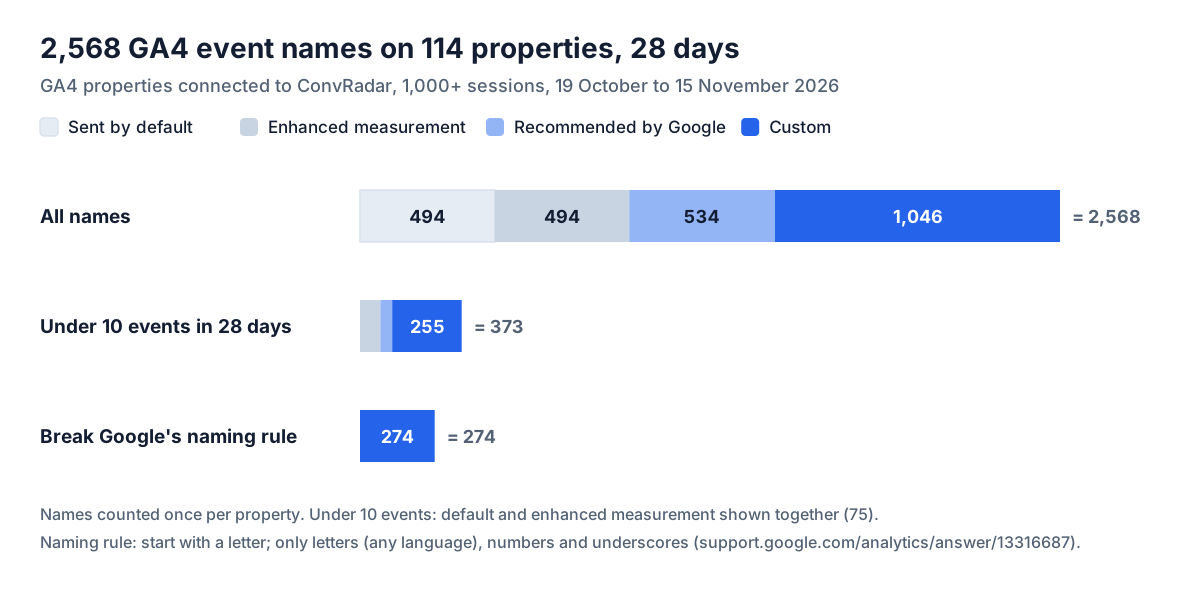
373 of the 2,568 names (15%) fired fewer than 10 times in the 28 days, and together they carried 1,294 of 186 million events. 255 of them are custom, 24% of the 1,046 custom names, and 54 are marked as key events. Under 10 a month is normal for a lead on a small site or for a paid plan. For a click or a page step it means a trigger that misses, and the plan row either fixes the trigger or drops the name.
How common duplicate and inconsistent GA4 event names are
7 of 114 GA4 properties connected to ConvRadar sent one action under two names that differ only in case or punctuation from 19 October to 15 November 2026, 10 such pairs, and 4 of the pairs include a key event. 7 put a value inside the name: 43 names like Scroll10 and Scroll25, where one name and a parameter do the job. 13 properties do one or both. 274 names on 27 properties break Google's naming rule with a space, a dot, a hyphen, a colon or a first character that is not a letter, and GA4 records them anyway. 184 names on 36 properties carry capital letters, which GA4 allows and a plan written in lowercase rules out.
The rows a store and a lead site start with
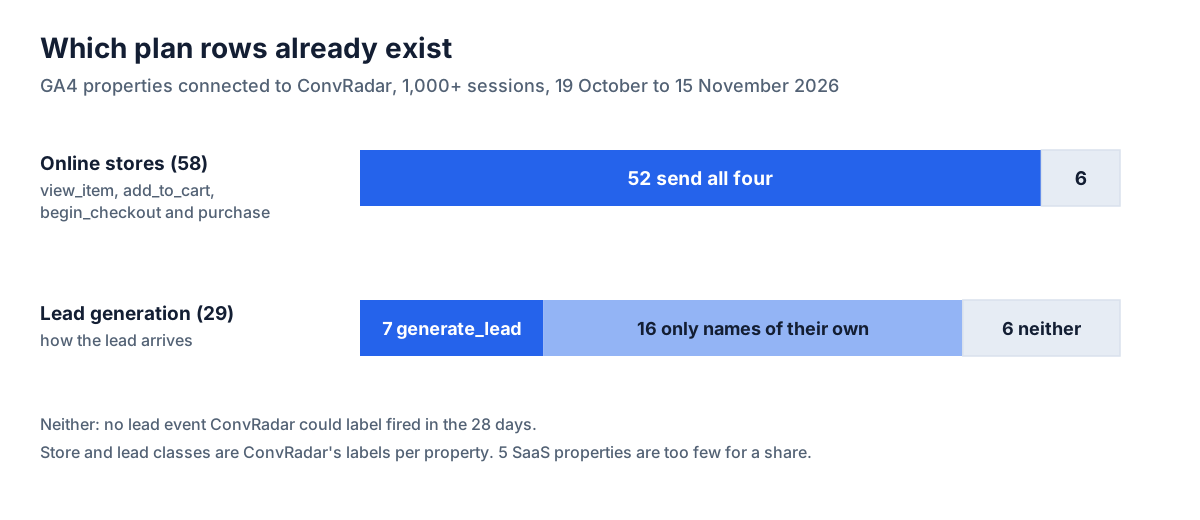
52 of 58 online stores among the 114 sent view_item, add_to_cart, begin_checkout and purchase from 19 October to 15 November 2026, against 7 of 29 lead generation sites that sent generate_lead. 16 of the 29 count the lead only under names of their own. A store's plan opens with its four funnel rows already arriving, and its work is the parameters Google lists for them. A lead site's P1 row is the lead itself, and its "when it fires" cell decides whether GA4 counts leads or clicks on a Send button. The other 27 of the 114 are 8 booking, 7 media, 5 SaaS and 7 other or unlabelled properties, too few per kind for a share.
| Site | Event | Parameters Google lists | Key event |
|---|---|---|---|
| Store | purchase | transaction_id, value, currency, items | yes |
| Store | begin_checkout | value, currency, items, coupon | no |
| Store | add_to_cart | value, currency, items | no |
| Store | view_item | value, currency, items | no |
| Lead site | generate_lead | value, currency, lead_source | yes |
| SaaS | sign_up | method | yes |
| SaaS | purchase | transaction_id, value, currency, items | yes |
Parameters come from Google's recommended events reference, where currency is required whenever value is set. A SaaS plan stops at the account and the payment, because activation and trial-to-paid live in the product and billing data, not GA4, as GA4 for SaaS covers.
Worked example: convradar.com, 38 event names and 457 key events
I sell a tool that builds tracking plans. My own site, convradar.com, is a self-serve SaaS: the conversion is an account, then a GA4 property connected to it. From 19 October to 15 November 2026 it sent 38 event names to GA4 over 795 sessions. GA4 counted 457 key events, and 14 events said a GA4 property was connected.
All 457 come from four names, and each fires on pages or buttons rather than when an account is created. Trial_start fires on 7 different pages, two of them articles, and every one of its 352 events is a key event. Trial_started fires on 4 onboarding pages, so one account can fire it four times: 121 events and 86 key events, a gap that holds in all four weeks, the pattern once-per-session counting leaves. signup_google_click (11) and connect_analytics_click (8) are button clicks.
The rest of the list repeats itself. On /connect/property alone, form sends arrive as 111 form_submit, 211 F_form_submit and 112 F_gtm.formSubmit. A Tag Manager tag sends "F_" plus the name of whatever dataLayer event fired it, F_form_submit arrives about twice per form_submit, and the same tag adds F_form_start and F_gtm.formInteract when the first field is touched. Scroll arrives under six names: a tag that writes the threshold into the name sends Scroll10 through Scroll90, 3,639 events, and GA4's own scroll at 90% adds 129. A tag on every click sends clicks, 2,168 against 2,049 page views, and another sends LinkClick, 299. 13 of the 38 names fired fewer than 10 times.
The plan below is my own, written by hand from those 28-day counts so every number can be checked against the list above.
| Priority | Event | When it fires | Parameters | Key event | Today in GA4, whole site, 19 Oct to 15 Nov 2026 | Who adds it |
|---|---|---|---|---|---|---|
| P1 | sign_up | The server creates the account | method | yes | not sent; Trial_start 352 on 7 pages and Trial_started 121 on 4 stand in | Developer; then Trial_start and Trial_started go |
| P1 | ga4_connected | A GA4 property is connected | client | yes | 14 under three names: ga4_connected_chatgpt 12, _claude 1, _direct 1 | Developer: one name, the client as a parameter |
| P1 | purchase | The payment provider confirms a paid plan | transaction_id, value, currency, items | yes | not sent, 0 in 28 days | Developer |
| P1 | key event settings | 4 key events: Trial_start, Trial_started, signup_google_click, connect_analytics_click | GA4 Admin: unmark the four, mark the three rows above | |||
| P2 | plan_click | A plan button on /pricing is clicked | plan | no | plan_click_pro 5, plan_click_basic 3 | Tag Manager |
| P2 | form_submit | A form is sent | form_id | no | 252, next to F_form_submit 513, F_gtm.formSubmit 270, F_form_start 468 and F_gtm.formInteract 197 | Tag Manager: pause the F_ tag, keep GA4's own |
| P3 | scroll | 90% of a page is reached | no | 129, next to Scroll10 to Scroll90, 3,639 | Tag Manager: pause the Scroll tag, keep GA4's own | |
| P3 | remove clicks and LinkClick | no | 2,168 and 299 | Tag Manager: pause both tags |
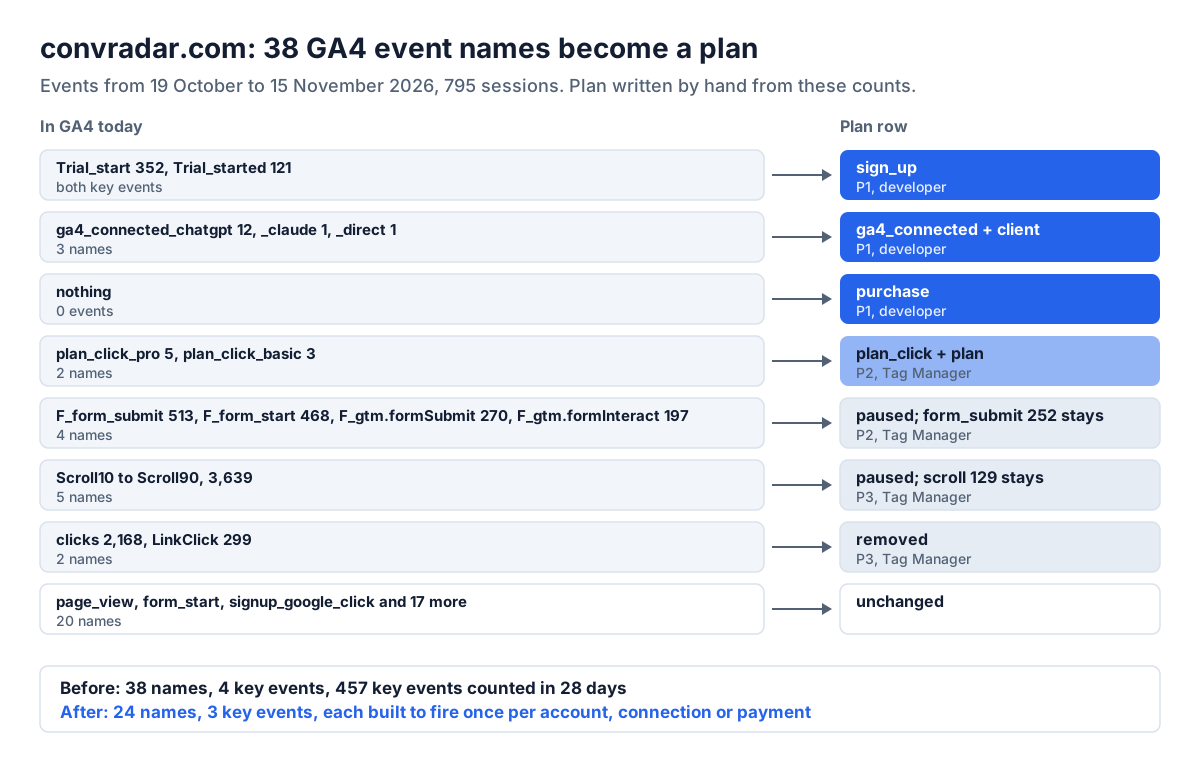
Applied, the plan takes convradar.com from 38 event names to 24, and from 4 key events, counted 457 times from 19 October to 15 November 2026, to 3 built to fire once each: sign_up with method, ga4_connected with client, and purchase with transaction_id, value, currency and items. Two rows add an event. The other six change what already arrives.
Who adds each row
Tag Manager adds what a browser sees: a click, a form send, a thank-you page, a scroll. The developer adds what only the server knows, an account created or a payment confirmed, because a thank-you page view can count reloads and misses anyone who never returns to it. GA4 Admin holds the settings: key event marks, custom dimensions for the parameters, and events created from ones GA4 already receives. Pauses and removals are made in your own Tag Manager container, and on my site four of them take 11 names out of the list.
ConvRadar builds the tracking plan from 28 days of your GA4 events and up to 25 pages of your site, in about 10 minutes once your GA4 data has loaded: the events to add or fix, each with when it fires, its parameters, what GA4 records for it today and who adds it, ranked P1 to P3 (Basic, $5.99 a month, one build; Pro, $25, five). In Claude or ChatGPT, cr_get_tracking_plan returns it in the chat. A Tag Manager row carries a link: ConvRadar drafts the tag, saves it as a version in its own workspace without touching your tags, and nothing goes live until you click Publish on convradar.com. Claude and other MCP clients have the tag tools now, ChatGPT after OpenAI's review, and the Tag Manager walkthrough shows one request end to end. A GA4 setting row, such as marking a key event, applies when you click Apply, and Roll back undoes it.
Which two of your event names count the same click, and is one of them marked as a key event?