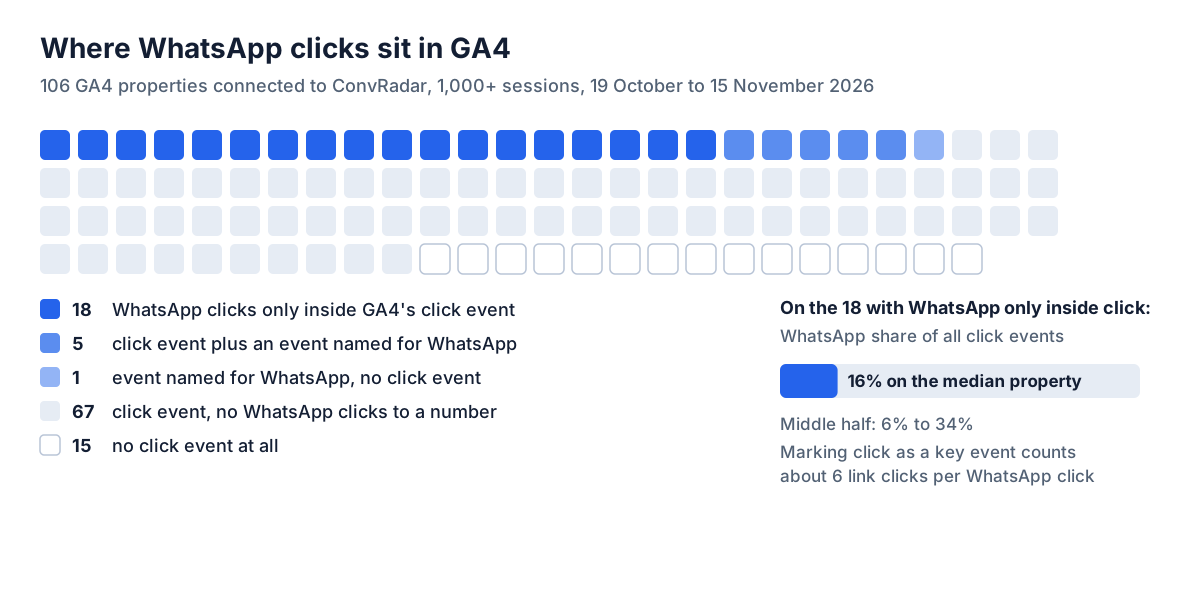
To track WhatsApp clicks in GA4 with Google Tag Manager, add a Click - Just Links trigger that fires when Click URL starts with https://wa.me/ (a second one for https://api.whatsapp.com/ if the site links there), attach a GA4 Event tag named click_whatsapp that sends link_url, publish the container, then mark click_whatsapp as a key event in GA4 Admin. Check GA4 before you build it. With enhanced measurement's Outbound clicks on, GA4 already records a click on a WhatsApp link as a generic click event. 6 of 24 GA4 properties connected to ConvRadar that recorded WhatsApp clicks between 19 October and 15 November 2026 tracked them as a separate WhatsApp event, under 4 different names; the other 18 had them only inside click. The 24 come from 106 properties with 1,000 or more sessions and 28 days of data in the window.
Does GA4 track WhatsApp clicks automatically?
Yes, when the button is a link and Outbound clicks is on. GA4's enhanced measurement fires click on every link that leads away from the site's domain and sends link_url and link_domain with it (Google, enhanced measurement events). A WhatsApp button built as <a href="https://wa.me/..."> is one of those links. In Explore, a free-form table filtered to Event name click with the Link domain dimension shows the WhatsApp clicks as rows for wa.me, api.whatsapp.com, web.whatsapp.com or wa.link, and those rows name the prefixes the trigger needs. A WhatsApp click here is a click on a WhatsApp link that carries a phone number: 4,111 of the 4,194 WhatsApp link clicks in the panel, the other 83 mostly share buttons.
90 of the 106 properties recorded click in the four weeks, and 16 recorded none at all. On a site with Outbound clicks off and no tag of its own, a WhatsApp link click leaves nothing in GA4; the toggle sits in the web stream's enhanced measurement settings.
click cannot be the key event, because it counts every outbound link. WhatsApp was 16% of click events on the median of the 18 properties with WhatsApp only inside click, 6% to 34% in the middle half, so marking click as a key event there counts about 6 link clicks for every WhatsApp click. 23 of the 24 had their WhatsApp clicks inside click, and one of those 23 marks click itself as a key event.
The Tag Manager setup for WhatsApp links
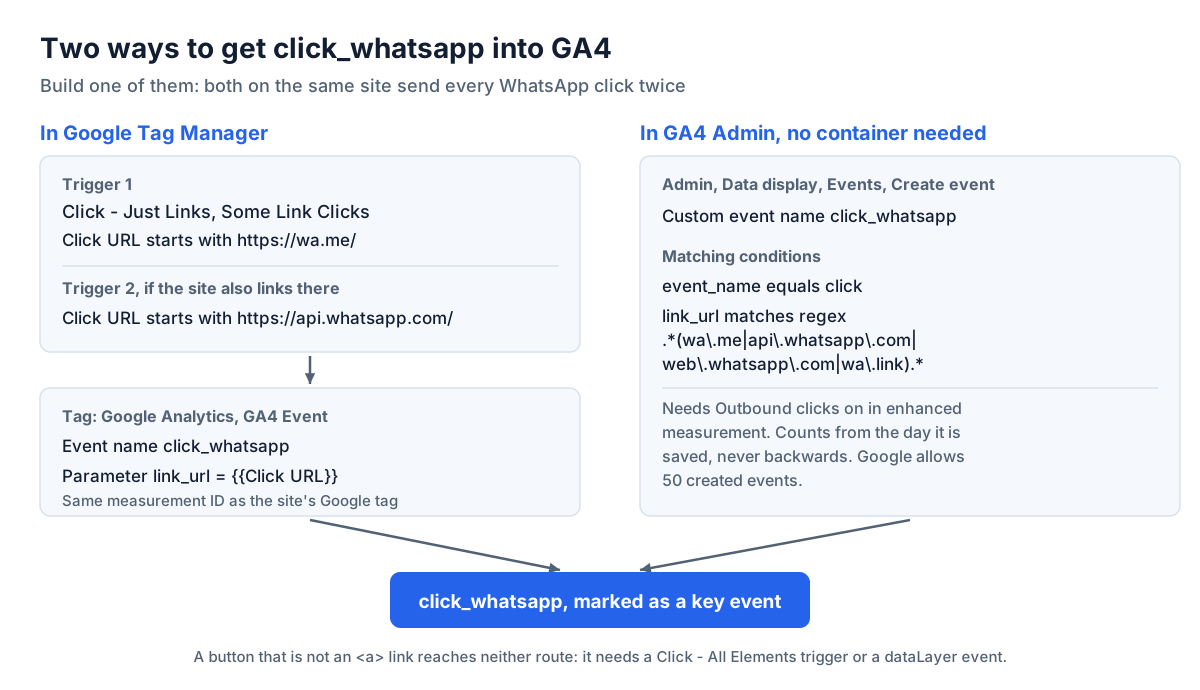
Enable the Click URL built-in variable first, under Variables, Configure. The trigger is Click - Just Links, Some Link Clicks, Click URL starts with https://wa.me/; Just Links sees only HTML links built with the <a> element (Google, click trigger). Conditions inside one trigger must all be true, so a site that links to more than one WhatsApp domain needs one trigger per prefix on the same tag, or a single condition, Click URL matches RegEx ^https://(wa\.me|api\.whatsapp\.com|web\.whatsapp\.com|wa\.link)/. WhatsApp documents wa.me/<number> with an optional ?text= for a prefilled message (WhatsApp, how to use click to chat); older links and some plugins use api.whatsapp.com/send?phone=. A share button, wa.me/?text= with no number, matches the same prefix and was 2% of WhatsApp link clicks in the panel. Leave the trigger on all pages: on the median site, 87% of WhatsApp clicks happened off the homepage.
The tag is a Google Analytics: GA4 Event tag with the same measurement ID as the site's Google tag, event name click_whatsapp, and one event parameter, link_url set to {{Click URL}}, which GA4 reports in the same Link URL dimension enhanced measurement fills. The URL carries the business's number and any prefilled text; if a form on the site writes the visitor's details into ?text=, leave link_url out. Give the tag the consent settings of the container's other GA4 tags. Pick one event name and keep it: the 6 properties with a WhatsApp event of their own use 4 names between them, whatsapp_click, click_whatsapp, whatsapp_klik and booking_whatsapp.
Preview the container, click the button, and confirm the tag fired in Tag Assistant and the event arrived in GA4's DebugView, then publish. Once click_whatsapp shows in GA4, mark it under Admin, Data display, Key events, New key event, and import it into Google Ads as a conversion if the campaigns should bid on it. On Shopify, a container added as a custom pixel under Customer events runs in a sandbox where, Google says, many trigger types and Preview mode do not work correctly, and Google does not support that setup (Google, custom pixel limitations).
When the WhatsApp button is not a link
A button that opens WhatsApp from JavaScript has no link, so neither GA4's click nor a Just Links trigger sees it. A Click - All Elements trigger on Click Element matches CSS selector, for example .whatsapp-btn, .whatsapp-btn *, fires the same tag, with link_url empty because the element has no link. A dataLayer event, when the widget pushes one, survives a redesign that renames the class: a Custom Event trigger on its name fires the same tag, and Preview mode lists every dataLayer event a click produces. The Click to Chat plugin for WordPress pushes one called Click to Chat with the number and the post title (HoliThemes). A widget inside an iframe from another domain hides its clicks from the page's container, and they reach GA4 only through the vendor's own analytics setting or a message the widget posts to the page.
Without Tag Manager: create the event in GA4 Admin
When Outbound clicks is on and the button is a link, GA4 can split WhatsApp out of click with no container. Under Admin, Data display, Events, Create event, name the new event click_whatsapp with two matching conditions, event_name equals click and link_url matches regex .*(wa\.me|api\.whatsapp\.com|web\.whatsapp\.com|wa\.link).*, and leave Copy parameters from the source event ticked. Created events apply from the day they are saved, never to historical data, and Google allows 50 of them (Google, rename and generate new events).
A created event and a Tag Manager tag with the same name send every WhatsApp click twice, so build one of the two.
Why the WhatsApp click event does not match GA4's count
Preview mode and DebugView show that the tag fires on one click. When every WhatsApp button on the site is an <a> link, GA4's click filtered to the WhatsApp link domains counts the same clicks, and a week of both side by side shows whether the tag fires on every WhatsApp click and only on those.
6 of the 106 properties send a WhatsApp event of their own, and on the 5 where both counts ran on the same days, 2 agree within 15%, one of them on 13 events. A store sent 2,740 whatsapp_click events against 2,643 WhatsApp clicks in GA4's click over 28 days, and a lead generation site 6 against 7 over 3 days. A SaaS site sent 724 against 144 over the same 16 days. A booking site sent 10 against 20 on the 3 days its event fired, out of 27 days with WhatsApp clicks.
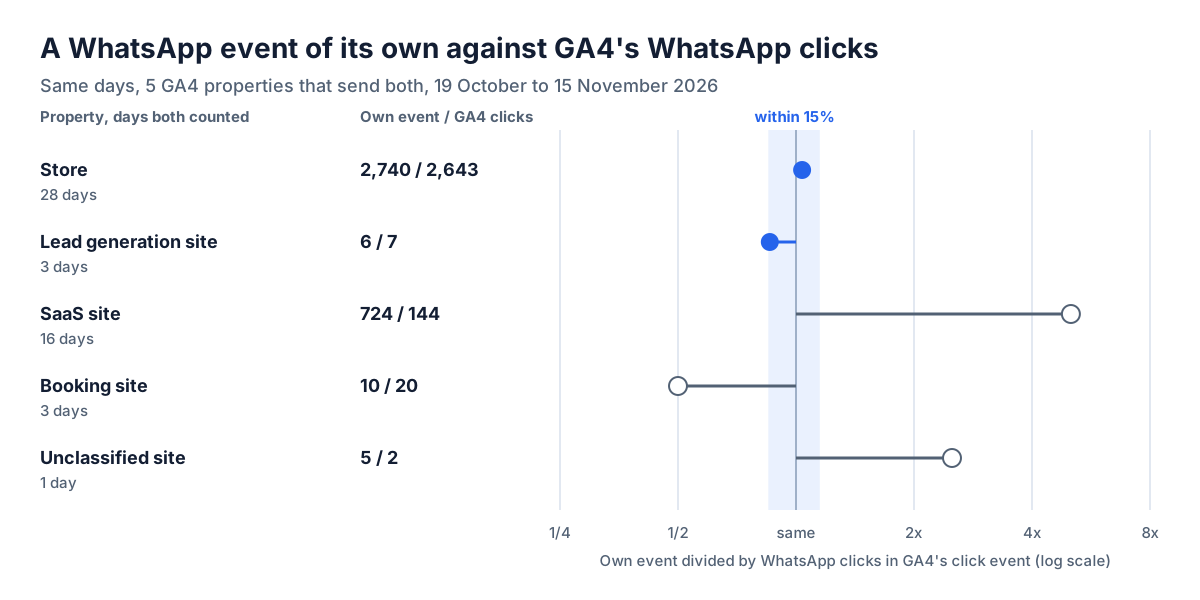
A tag count well above click points at two routes sending one name, or a trigger that also catches buttons click cannot see. Well below points at a prefix missing from the condition, or pages the container does not load on. The counts only say which tag to open in Preview mode.
WhatsApp button click-through rate: 0.13 clicks per 100 sessions
A WhatsApp button got 0.13 clicks per 100 sessions on the median of 23 GA4 properties connected to ConvRadar that recorded WhatsApp link clicks, 19 October to 15 November 2026, so at most 0.13% of sessions clicked it; the middle half ran from 0.06 to 0.68. The median was 0.16 on 11 online stores and 0.07 on 7 lead generation and booking sites. 5 of the 23 reached 1 click or more per 100 sessions. The highest, a store at 38, logged 2,643 WhatsApp clicks against 16 GA4 purchases in the same four weeks. 90% of WhatsApp clicks came from phones on the median property.
A WhatsApp click counts someone who tried to start a chat; whether a message followed is recorded in WhatsApp Business. Every key event also enters the Key events column and the session key event rate, where 41 of 68 properties measured in September and October count something besides their conversion, or never count it.
Tracking WhatsApp clicks from Claude with ConvRadar
Until 2 November 2026 ConvRadar's own GA4 sync stored click by date and device only, so when I read a client's clicks, a WhatsApp click and a tap on the footer Instagram icon were the same number. Now Claude, connected to GA4 through ConvRadar, takes "track WhatsApp clicks" as a request. If the account has not allowed Tag Manager edits yet, the reply is an Allow link, a separate Google consent. On a site that loads a container your Google account can edit, the reply gives the WhatsApp clicks GA4 kept inside click in the last 28 days and drafts a click_whatsapp tag and trigger for each WhatsApp prefix on the pages ConvRadar reads, the home page and one page you name, or for both wa.me and api.whatsapp.com when only GA4's clicks show the links. When GA4 recorded an event named for WhatsApp in the last 28 days, or a live tag already sends one, it says so instead of drafting a second. If the home page shows no Tag Manager id, the reply says so and links to the tracking page to choose the container.
The tag tools run in Claude and other MCP clients; ConvRadar's ChatGPT app does not have them until OpenAI approves the update. Create saves the draft as a version in a ConvRadar workspace, and nothing is live until you publish it on the tracking page on convradar.com, a click outside the chat. A realtime check in the same chat then says whether click_whatsapp reached GA4 in the last 30 minutes.