A standard GA4 property can mark up to 30 events as key events and an Analytics 360 property up to 50, and Google's default key events such as purchase come on top of that number, according to Google's help page on key events. On 105 GA4 properties connected to ConvRadar, read in November 2026, the median property uses 2 of those 30 slots and the most any of them uses is 24. 236 of the 526 key events marked on the 105 properties (45%) did not fire once between 18 October and 14 November 2026.
Key events are what GA4 called conversions until March 2024. The 105 are the connected properties with 1,000 or more sessions in that window; how they were counted is at the end.
How many key events can you mark in GA4?
Thirty custom key events on a standard property, fifty on Analytics 360. Google's default key events are "in addition to the number of events you can mark as key events": purchase everywhere, first_open, in_app_purchase, app_store_subscription_convert and app_store_subscription_renew on apps, and, with Ads Personalization on and Google Ads linked, add_to_cart, add_to_wishlist, begin_checkout, session_start, view_item, view_item_list and view_search_results. GA4's Admin API flags every key event as custom or default, and its reference says custom ones "count towards the maximum".
A custom slot is taken the moment the toggle is on, whether the event has arrived or not. Google's page says new events "might not show up right away, but you can still mark them as key events ahead of time."
Google does not say what happens when a standard property tries a 31st. Its Analytics 360 page covers a property left with more than 30 after a downgrade from 360: it has to unmark events until it is below 30 before it can mark another. Turning a key event off applies forward only, and "past events still show in reports as key events," so a key event that has stopped firing loses nothing in any report when it goes.
How many key events do GA4 properties use?
The median GA4 property connected to ConvRadar uses 2 of its 30 custom key event slots, and 104 of the 105 use 19 or fewer. I built key event marking into ConvRadar this week, before counting how close real properties come to the limit; the closest is 6 away. 30 of the 105 use none and count only Google's defaults. With the defaults included, the median property has 3 key events. Across all 198 connected properties with a key event list, none has more than 24 custom ones.
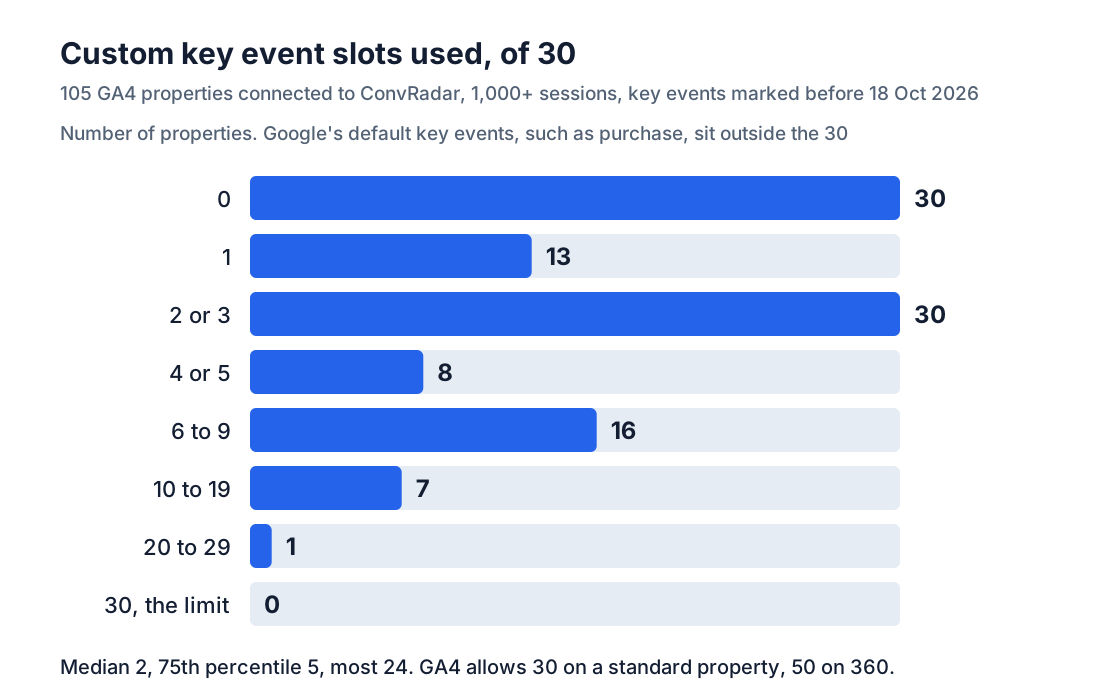
The one property above 19 is a booking site with about 2,900 sessions in the 28 days. It has 24 custom key events, 6 short of the limit, and 14 of the 24 did not fire once in the 28 days. 10 of those 14 were marked in 2022 and 2023, when GA4 still called them conversions. Turning the 14 off would leave it 20 free slots and take no number out of any report.
What share of GA4 key events do not fire?
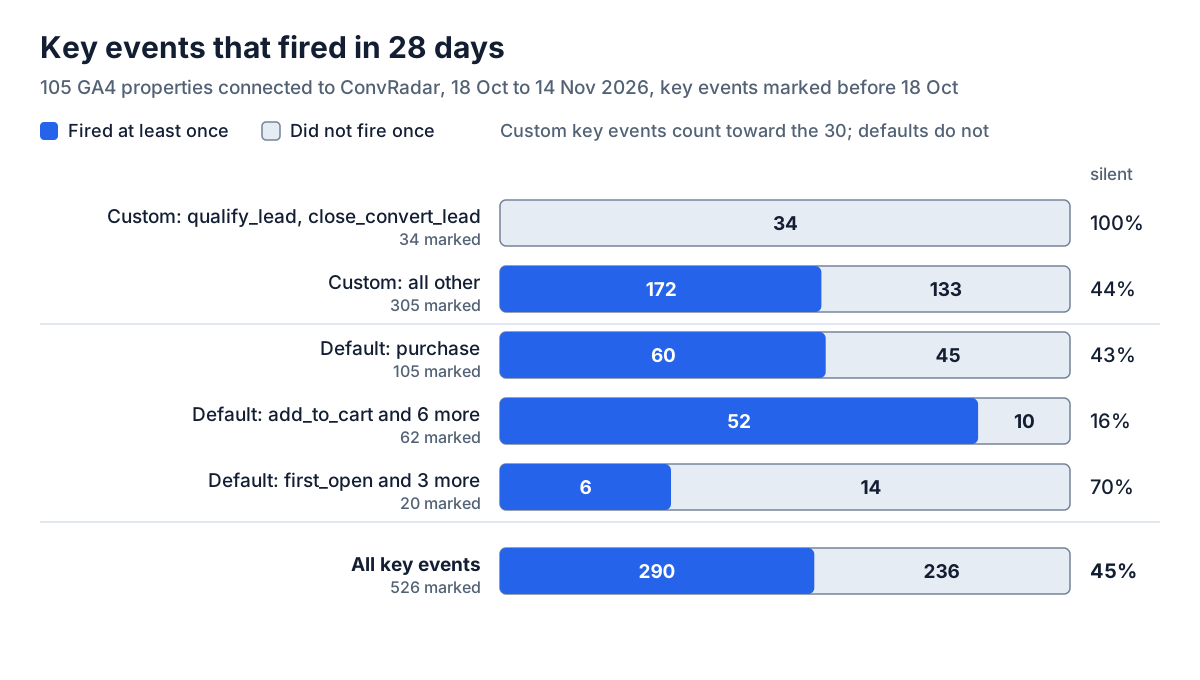
236 of 526 key events marked on 105 GA4 properties connected to ConvRadar (45%) did not fire once between 18 October and 14 November 2026, on 77 of the 105. Of the 339 custom key events, the ones that count toward the 30, 167 (49%) were silent.
Not one of the 34 qualify_lead and close_convert_lead key events, spread over 17 properties, fired. 24 of the 34 sit on online stores. Both are custom, so the pair takes 2 of the 30. 48 of the 198 connected properties carry the pair. On 47 of them both were created in the same minute, and on 37 in the same two minutes as purchase, the earliest in June 2025. Two toggles in one minute, 47 times over, reads as one setup step rather than 47 people clicking fast, and Google's default list does not name the pair. Its lead acquisition report page says only that the report is "populated by sending the events outlined in the lead generation recommended events". On these 17 properties none arrived.
The other custom key events were silent 133 times out of 305, on 44 of the 64 properties that have any. Age splits them. Half of those created before 2026 were silent, 121 of 241; of the 64 created this year before 18 October, 12 were.
purchase did not fire on 45 of the 105 properties. On the 26 that ConvRadar classifies as lead generation sites it was silent on all but one, on the 54 online stores on 2, and the other 18 are booking, media, SaaS and other sites. It takes no slot either way. Of Google's other defaults, add_to_cart and its six companions were silent 10 times out of 62, and the four app events 14 times out of 20.
A key event that does not fire adds 0 to the Key events column, so the column never shows it. 16 of the 105 properties counted 0 key events in the 28 days, which puts their session key event rate at 0% of sessions. 8 of the 16 are lead generation sites, out of 26 in the set, and each of the 8 has between 1 and 7 key events marked. On 4 of them an event ConvRadar reads as the lead fired up to 532 times without being a key event. On the other 4 no lead event fired at all.
One store: 12 custom slots used, all 12 silent
A store with about 11,900 sessions in the 28 days has 16 key events. The 4 that fired are Google's defaults, outside the limit: view_item 8,882 events, add_to_cart 624, begin_checkout 245 and purchase 136. Its 12 custom key events, the only ones that count toward the 30, were all marked in November 2024 and fired 0 times: add_shipping_info, add_payment_info, remove_from_cart and 9 events under the store's own names.
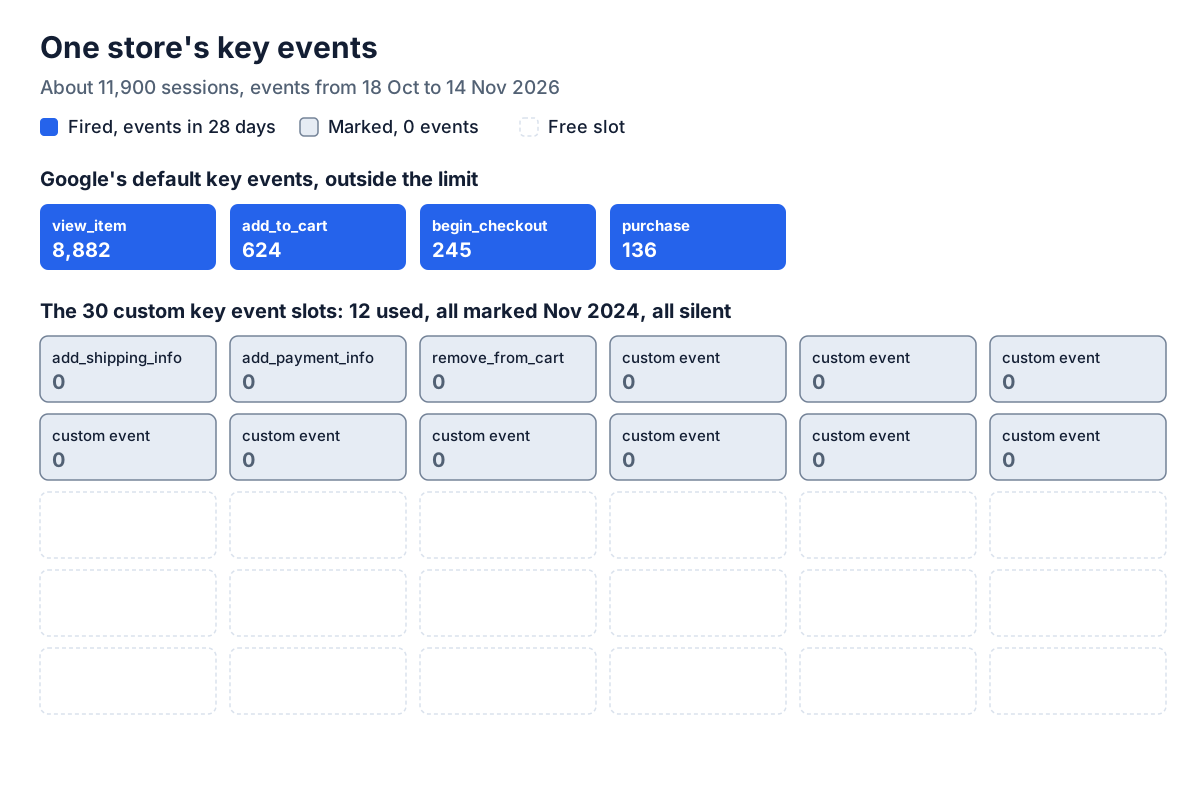
Two of the silent ones are checkout steps. GA4 received 245 begin_checkout and 136 purchase events in the 28 days and no add_shipping_info or add_payment_info, the two events GA4's checkout journey report needs whether they are key events or not. Turning the 12 off frees 12 slots and takes no number out of any report. The 8,882 view_item events in the store's Key events column are a different problem, key events that outnumber purchases.
How many key events should a site mark?
The median GA4 property connected to ConvRadar had 2 key events that fired at least once between 18 October and 14 November 2026, defaults included. The list worth keeping is the conversion, plus a step only when a Google Ads goal bids on it.
A store has purchase already, as a default. add_to_cart and begin_checkout earn their place when a Google Ads goal bids on them, and then the Key events column counts them as conversions too.
A lead generation site marks the event that is the lead: generate_lead where the site sends Google's name, the site's own event name where it does not, and the call or messenger click if calls are part of its leads. purchase takes no slot and can stay. qualify_lead and close_convert_lead earn their two slots once something sends them.
A self-serve SaaS product marks account creation, and purchase when billing sends payments to GA4. My own property is no cleaner. convradar.com has 5 key events: purchase with 0 events, two events named for a trial start, Trial_started 122 times and Trial_start 366 times in the 28 days, and two button clicks, 10 and 12 times. All four that fire count in its Key events column, 510 key events, 488 of them under the two trial names. Both trial names are still on as I write this.
How to check your own key events
Admin → Data display → Key events lists every key event the property has, including the ones that have not fired. Then open Reports → Engagement → Events, set the last 28 days and type each key event's name into the search box. No row means GA4 received no event of that name in those 28 days, unless the report shows an (other) row, where GA4 folds rare event names together.
If the missing one is your conversion, check the tag and whether the site had any conversions in the 28 days before anything else. If it is a custom event the site no longer sends, turning it off frees a slot and its past events stay in reports as key events. Before turning off a key event that does fire, open Google Ads at Goals → Conversions: an imported GA4 key event set to Primary in the Action optimization column steers bidding.
The Events report answers one name at a time. Connect GA4 to ConvRadar and ask Claude or ChatGPT for your key events with their events over the last 28 days: the list comes from GA4's Admin API at the last daily sync, a silent key event comes back with no events, and the answer names the event ConvRadar reads as your conversion, for you to confirm. If that event is not a key event, the tracking page marks it when you click Apply, after you turn on GA4 edits on a second Google screen and with the Marketer or Editor role on the property. Roll back deletes only a key event ConvRadar created. Key events you had before stay, and turning them off is a toggle in GA4 Admin that ConvRadar has no switch for, on its own property too.
The 105 GA4 properties are every property with an active connection by an outside client, 1,000 or more sessions and event data on each of the 28 days from 18 October to 14 November 2026, 9.0 million sessions in all; ConvRadar's own and demo properties and Shopify connections are excluded. Each key event list, with creation times and GA4's custom or default flag, was read from GA4's Admin API on 17 or 18 November 2026; the 198 lists were read between 21 September and 18 November. The 24 key events created on or after 18 October are left out of the 526, because Google lets an event be marked before it arrives. "Did not fire" means GA4's Data API reported no event of that name in the 28 days. Business types are ConvRadar's classification of each property, not a manual label.
A key event that does not fire leaves no row in any report to show it.